Introducing the new
Pro PO Manager
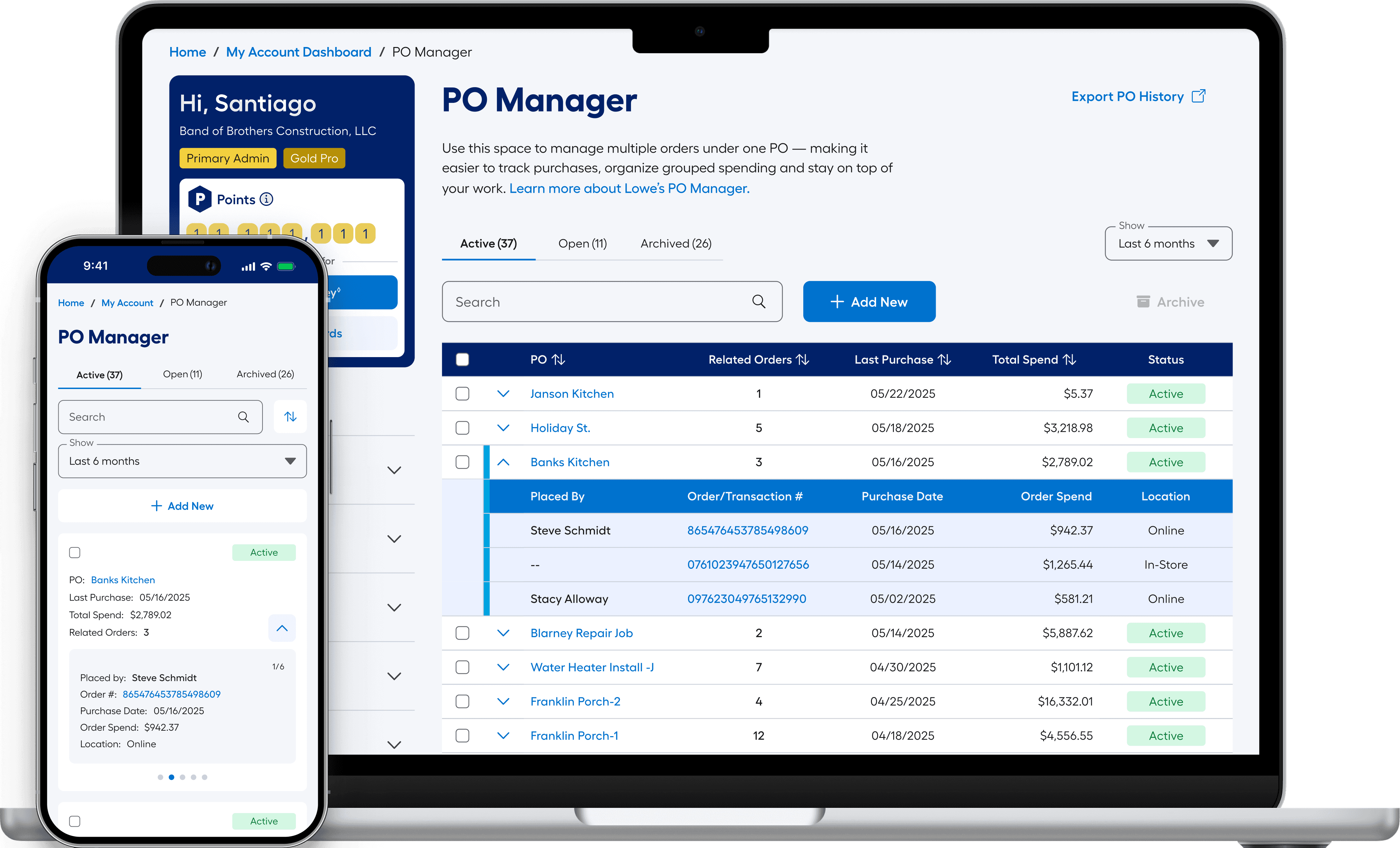
Executive Summary
It isn’t every day that you get to create a new product from the ground up, but that’s what I achieved with the new PO Management System from Lowe’s. Early signals from sales and the field pointed to a clear opportunity: we were missing a better way to help Pros manage their orders.
After some initial digging, a deeper issue emerged. Users were frequently entering inconsistent PO and Job Name values—misspellings, duplicates, and entirely new entries when they simply should have been recalling existing ones. What should have been a stable reference point became fragmented, making it difficult to reuse or recall information when it mattered most.
We explored separating PO’s and Job Names, but quickly saw that supporting two primary identifiers would introduce unnecessary complexity. Instead, we made a deliberate decision to formalize PO’s as the primary identifier and design a system around them—one that could remain flexible while bringing structure to how this data was captured, stored, and surfaced.


From white-boarding sessions to research questionnaires, from low-fidelity testing with real Pros to deep technical discussions with engineers, we worked toward a focused solution. The result was a strong MLP (Minimum Lovable Product) that brought structure to the system. We transformed PO data from one-off inputs into something reusable, traceable, and meaningful across the purchase lifecycle.
Welcome to the new PO Management System from Lowe's.

The Dynamic Field
Easy entry & recall at the moment of purchase
The Pro PO Manager
Interacting with the Dashboard
*Keep scrolling for the full case study.

What's in a Good Identifier?
What is a PO? What is a Job Name? These are foundational concepts many in the industry take for granted. When we looked closer, the issue wasn’t just what they meant—it was how they were being used, and how little the system could actually do with the data they produced.
💡
Key Findings
Accuracy in Budgeting: 73% of firms that track POs or Job Names report greater accuracy in job cost forecasting and improved overall project financial management.
Manual Errors: 46% of construction firms report issues with manual entry errors, resulting in lost or misfiled POs, inaccurate reporting, and budget overruns.
PO vs Job Name - Which is which?
Terms that can mean almost anything
Across major players in the Pro retail space, the distinction between POs and Job Names was inconsistently defined and often overlapping.
This ambiguity created friction at checkout, confusion in reporting, and inconsistent data capture.
We identified an opportunity to bring clarity to the model by structuring how POs are created, surfaced, and recalled—better reflecting how Pros actually track work across projects.
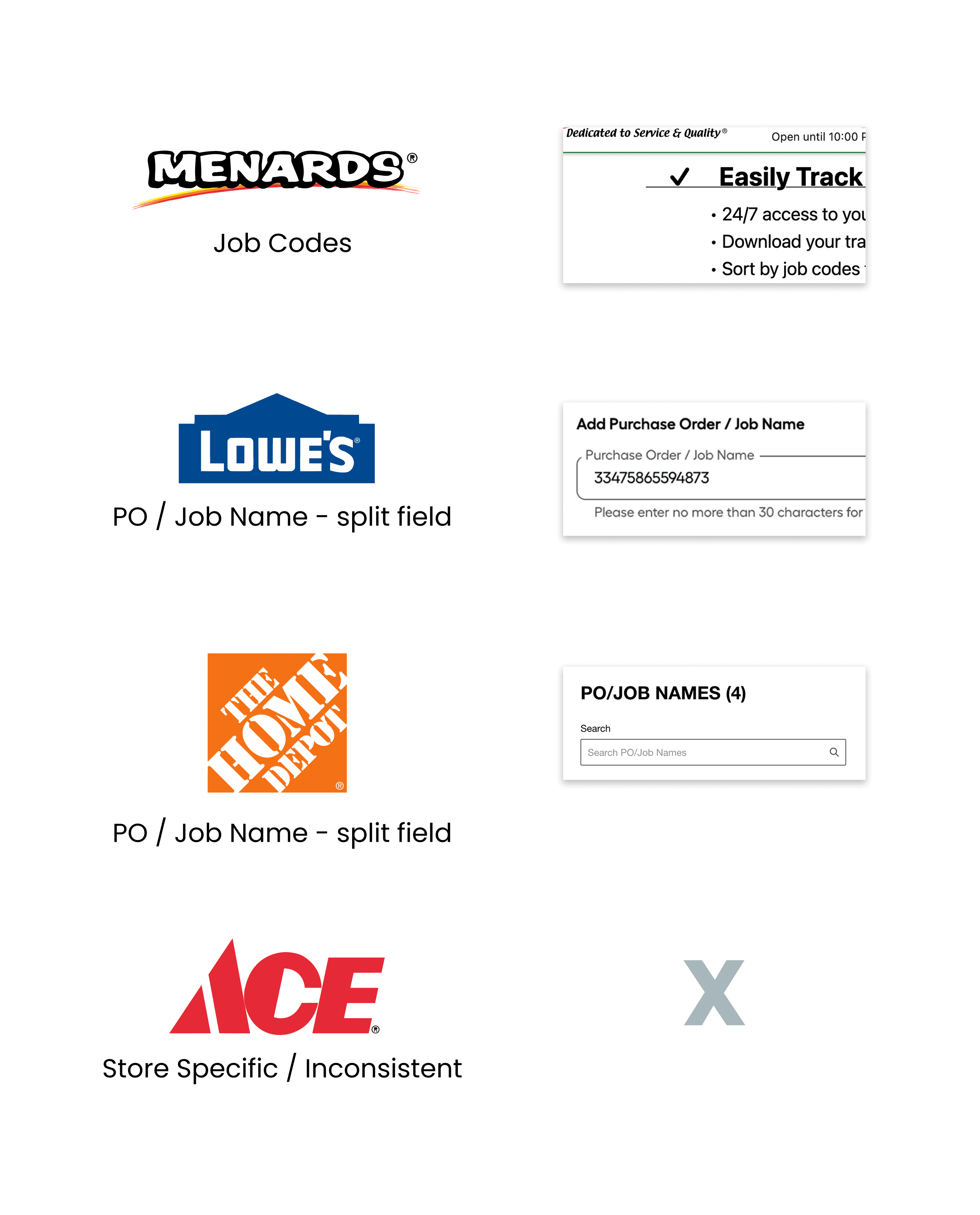
At this stage, we were still operating under the assumption that POs and Job Names should coexist as separate identifiers, so the early exploration focused on how both could function together within the system.
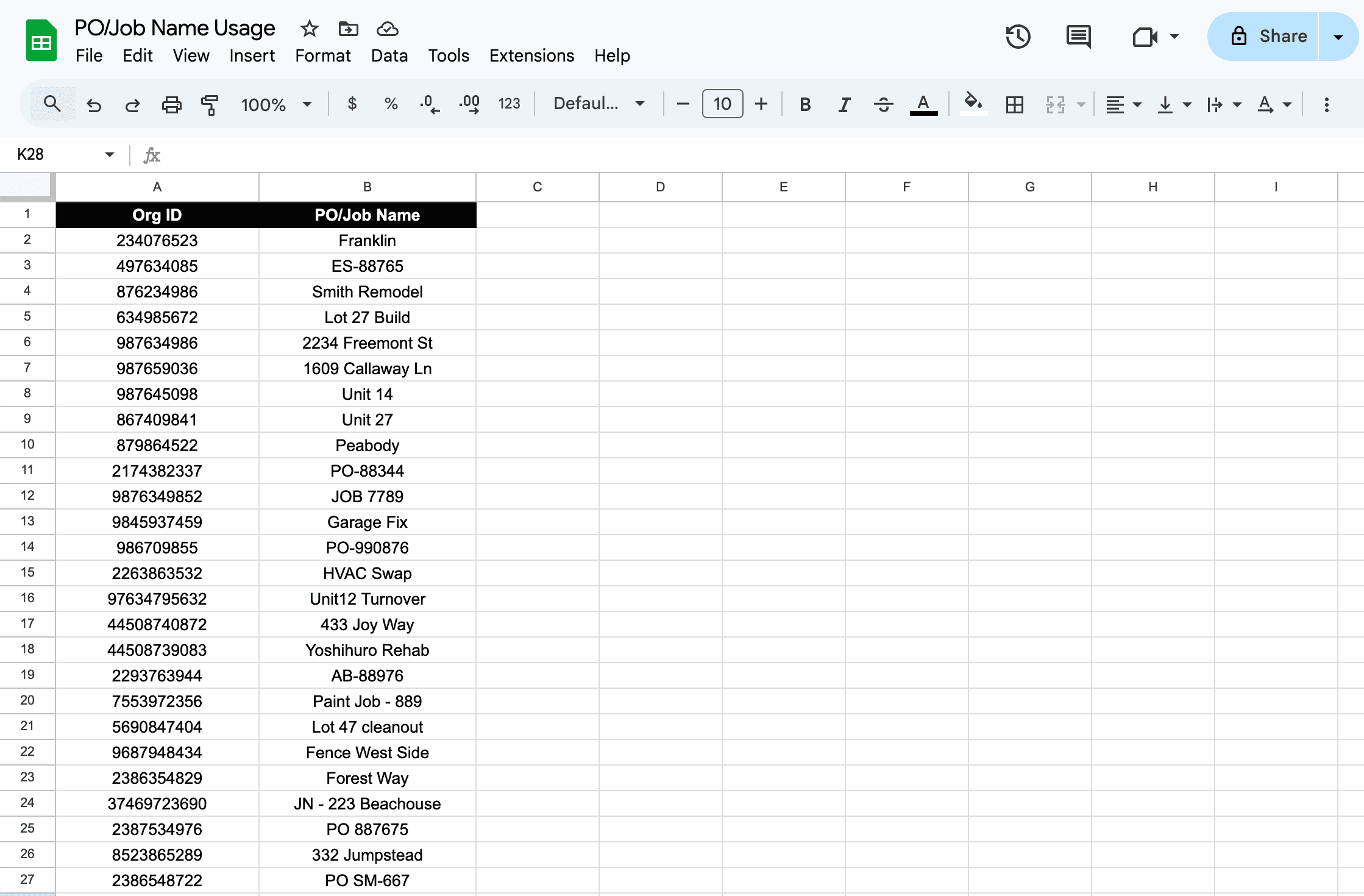
A dataset showing the variety of values users were entering into the split PO/JN field. Data modified for confidentiality.
In practice, users weren’t distinguishing between POs and Job Names at all—they were using the field to track whatever made sense for their workflow in the moment.
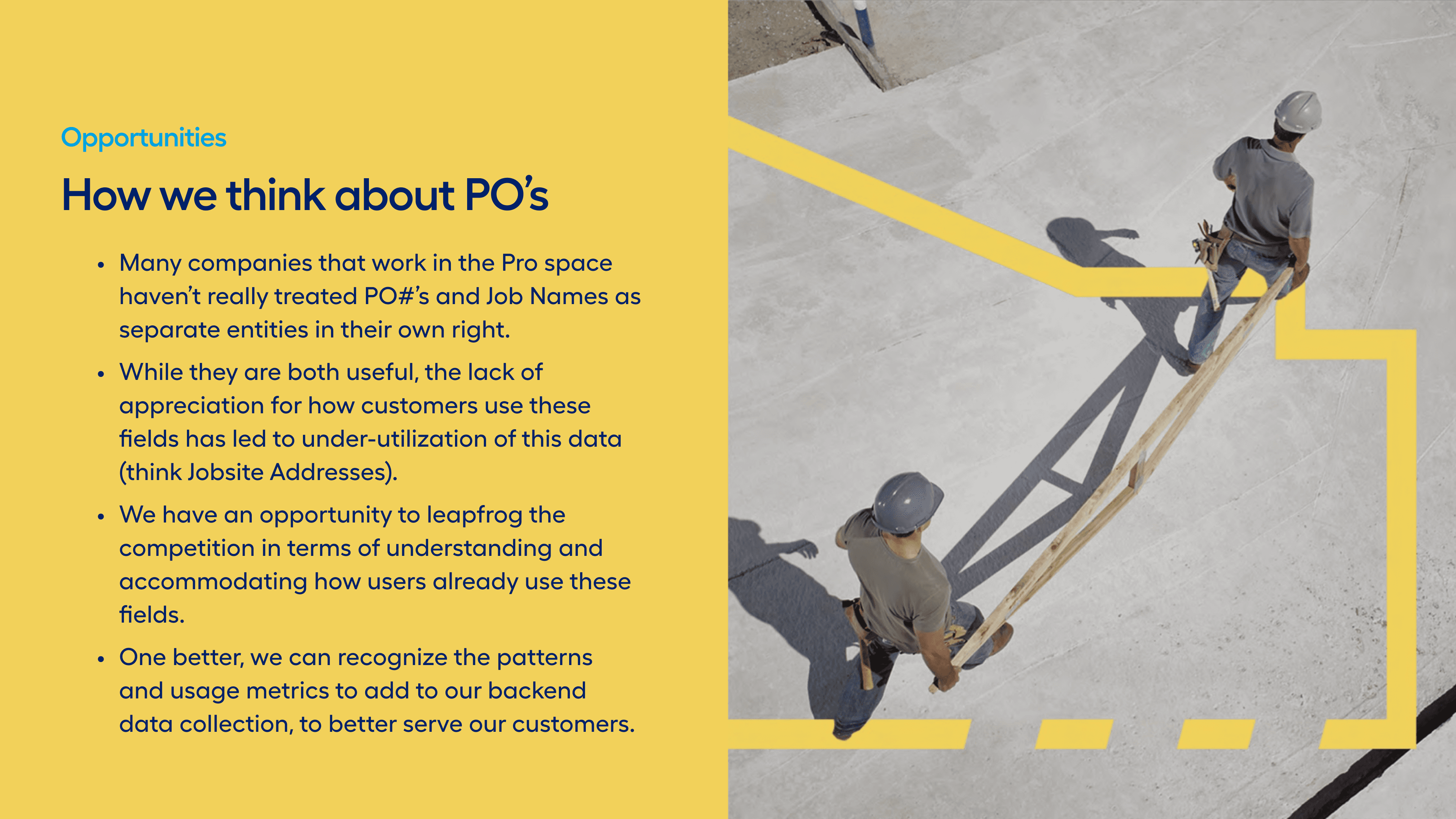
An early opportunity slide showing the line of reasoning we were working with. We were still considering the splitting of Job Name and PO into two separate identifiers.
To understand how these identifiers were actually used, I conducted a sweep across the purchase lifecycle—from quote creation and checkout to order history, returns, and account dashboards. The audit revealed a fragmented pattern: POs and Job Names appeared inconsistently, and rarely surfaced in ways that helped customers track their work.
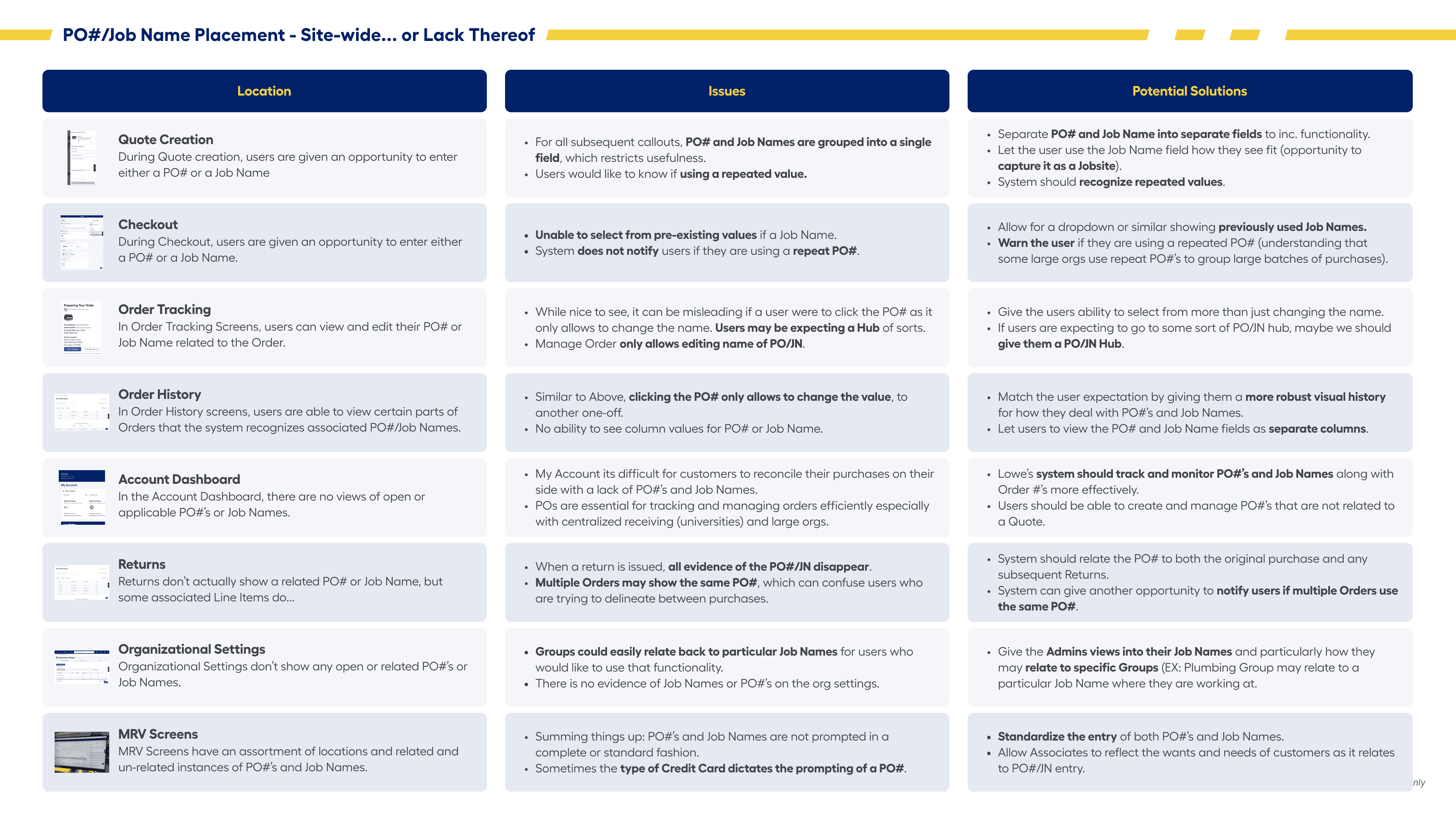
A slide mapping every surface where POs and Job Names appeared across the Lowe’s Pro ecosystem. Few of them meaningfully helped users and often added confusion instead.
It wasn't just customers who were struggling to use POs or Job Names across our systems but also associates using our internal systems. There were many mismatches between who could put what where, and how consistently items were displayed. I conducted boots-on-the-ground surveys and shadowing of store associates to understand their workflows and where there were gaps.
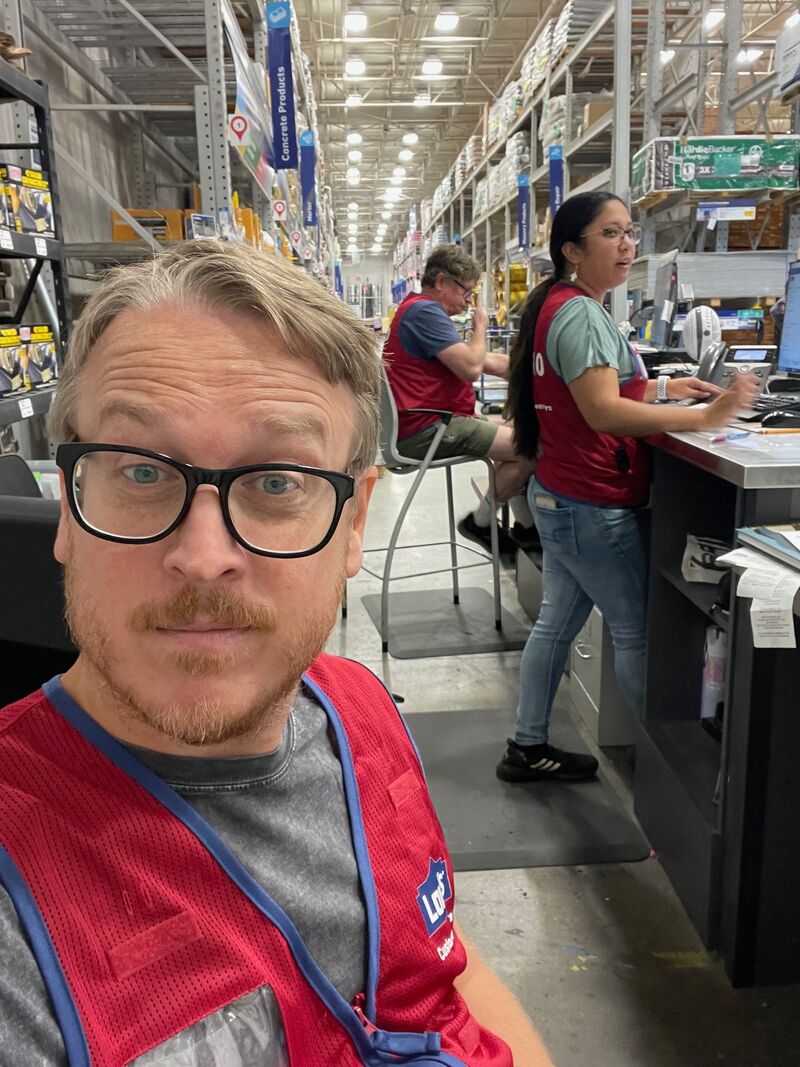
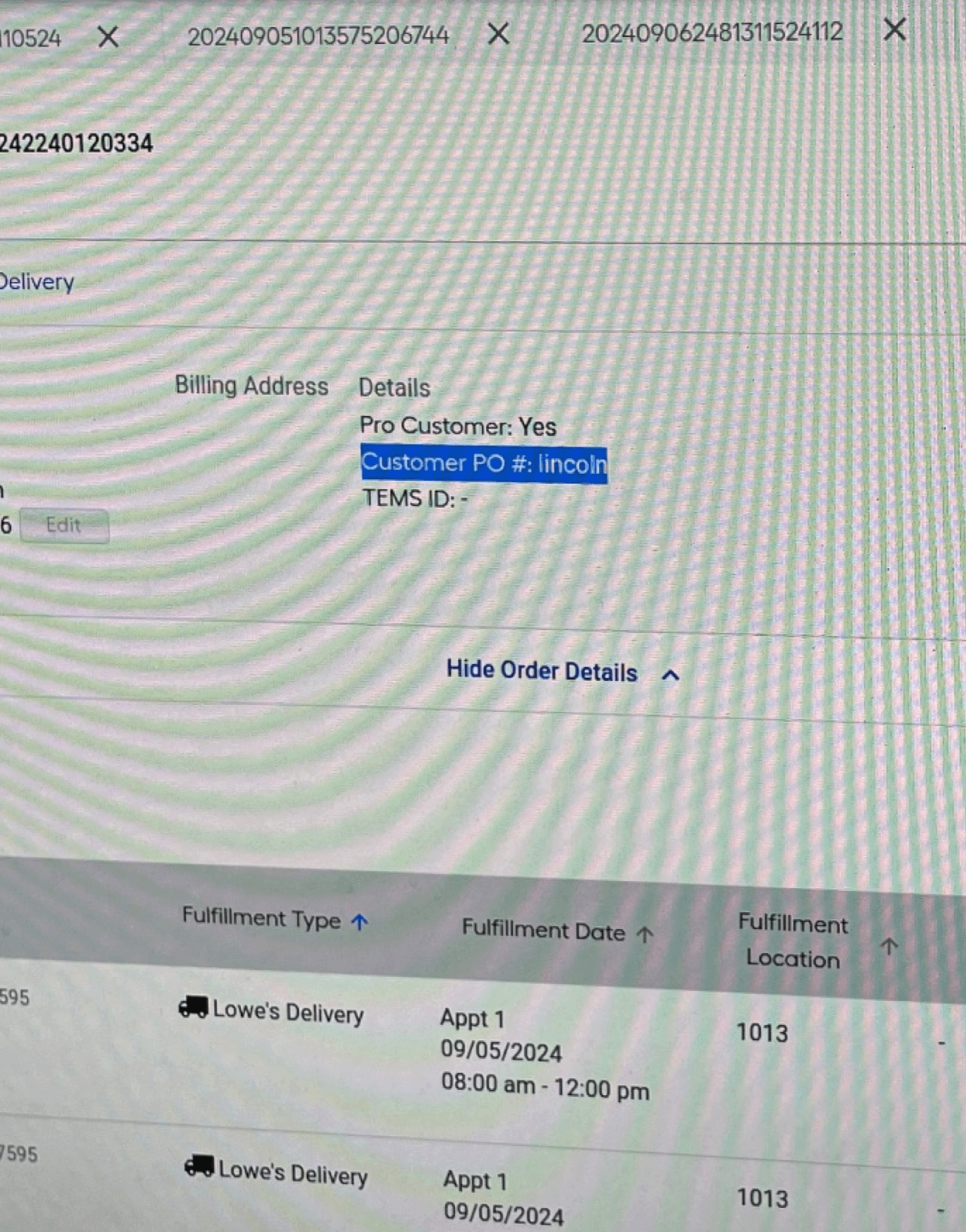
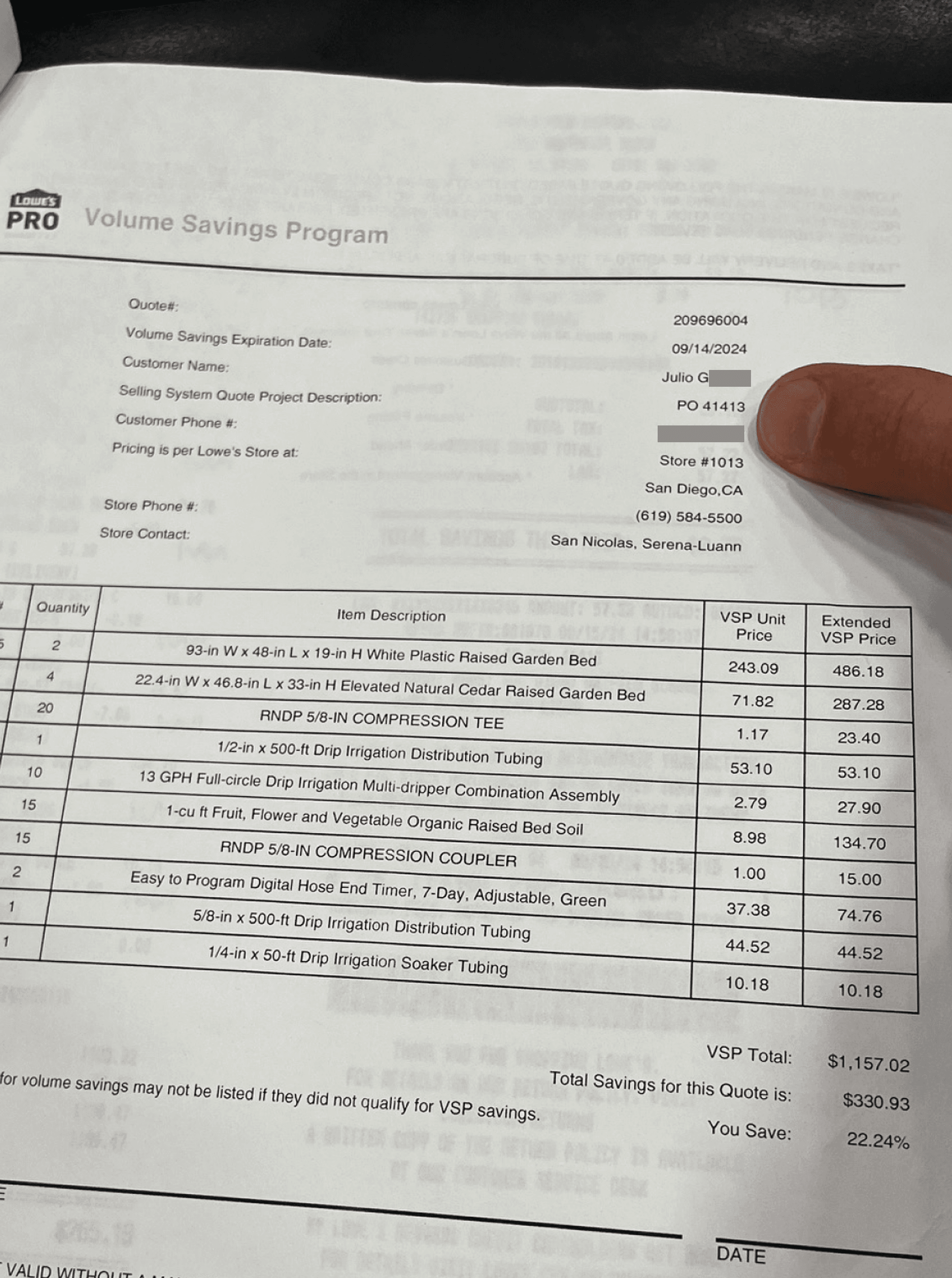
Left: At my local Lowe's Pro Desk as I shadowed associate and user interactions. Middle & Right: Examples of the many disparate locations where POs might occur.

Did you Know?
Customer vs Vendor POs: In our internal system, a PO field sometimes occurs in similar locations on the screen, but can refer to 2 separate values, either a Customer PO or a Vendor supplied PO, adding to confusion.
Required POs: 17% of Pro accounts require a PO entry at checkout. This can be helpful in forcing organization but…
Hacking the System: Somewhere between 3-12% of all inputs by subordinates on PO-required accounts resulted in bogus values to get past the *required screen entry.
Early exploration included separating the two fields, but the deeper insight was that the real issue wasn’t separation—it was the absence of a structured system for how PO data could be consistently captured, referenced, and reused across the ecosystem.
Supporting Both PO and Job Name Introduces Complexity
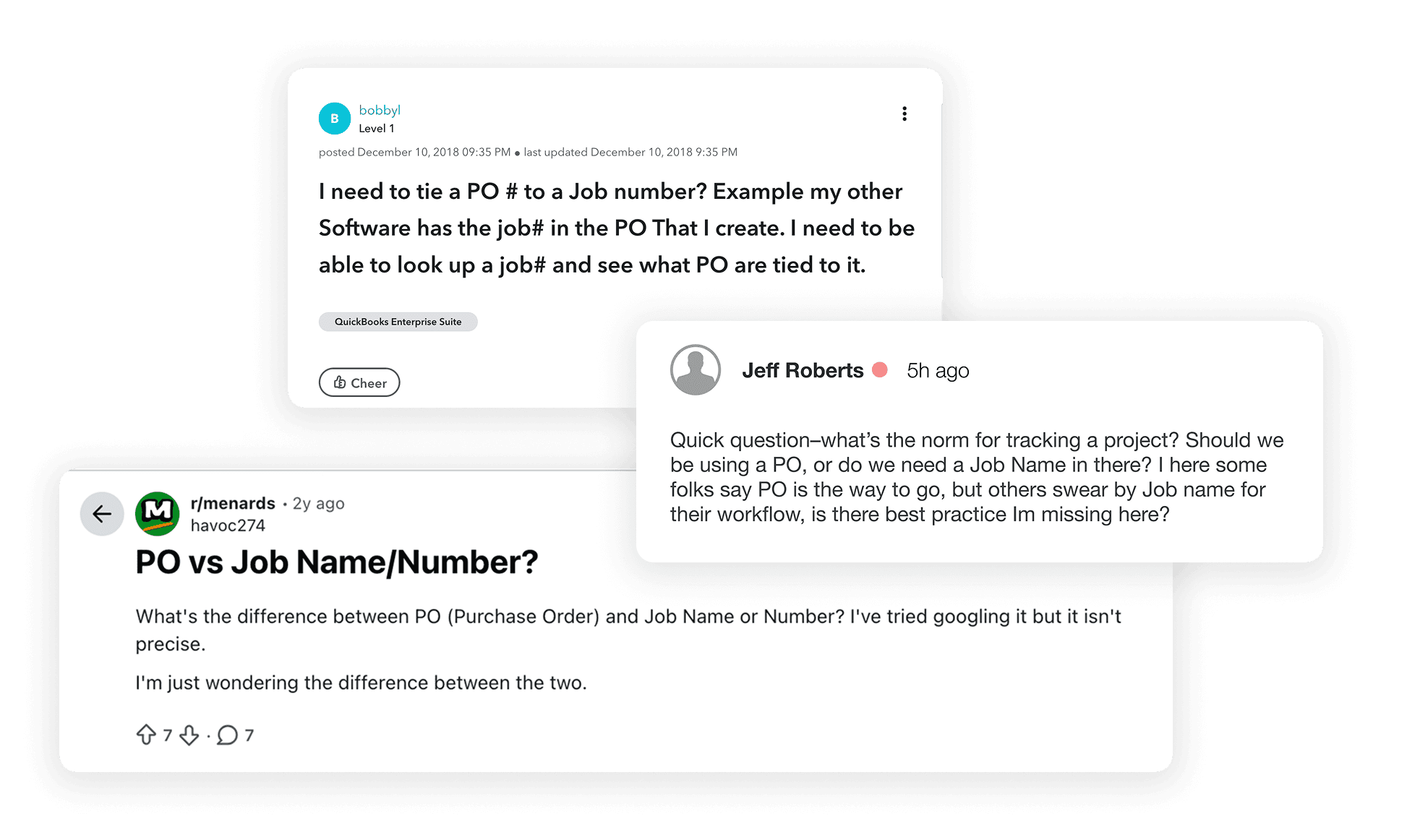
Examples of the confusion felt by users, Pros, associates, and many in between. What was the standard meaning behind the concepts of PO and Job Name? In practice, there wasn’t one.
As we began exploring how PO#s and Job Names might coexist in the system, the downstream implications quickly became apparent. Allowing both identifiers to function as top-level inputs would introduce significant complexity across the purchase journey—from how values were captured at checkout to how they would need to be stored, recalled, and surfaced throughout the ecosystem.
To clarify the implications, I created a quick low-fidelity workflow that mapped how the system would behave if both identifiers were allowed to lead the experience. Rather than debating the issue abstractly, the visual walkthrough helped make the complexity tangible.

Leading with PO – A scenario where a user views a data table led by PO. Key fields such as Buyer and assignment are present, with Job Name as a sub-value.
As you can see above, leading with PO has no real negative implications at this point. The rest of the data structure flows smoothly from one field to the next. But let’s look at the same data viewed leading with Job Name—it starts to get complicated.
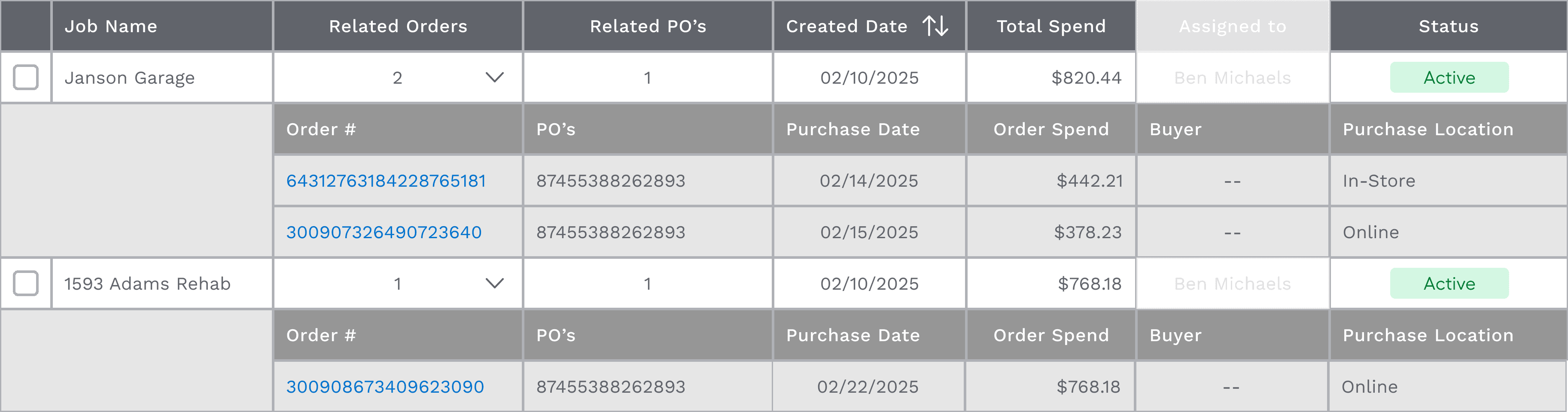
Leading with Job Name – A view of the same data led by Job Name. You can start to see the complications that arise.
⚠️
Caution
Key Identifier: What happens if a subordinate leads with PO and the admin leads with a Job Name?
Cross Conventions: Can a user include letter strings in a PO? Can a user include number codes in a Job Name? Are there characters that shouldn't be allowed?
Moving Orders: What if a user tries to move a Order between POs? Job Names?
Now things are starting to get interesting. As I shared these scenarios with the devs, it became clear the complexity was mounting.



The Pivot - Keep it Simple
We came to a new way of looking at the problem as an opportunity. The solution became clear: secure a single primary identifier. Users were nimble enough to work within the boundaries of one value, so we moved forward with the slight favorite from initial testing—the PO.
Not everyone was convinced though, so to keep the momentum going I worked with the PM and positioned the concept of keeping both identifiers as a “future improvement option" for leadership. This allowed us to move forward and reduce complexity across development, release timing, and system logic. With this resolved, we were able to move quickly into execution.

Designing the PO Experience
With the system now anchored around a single identifier, we could return to the real goal of the project: improving how Pros consistently manage and track their work.
We conducted several rounds of testing throughout the project, but some of the most telling insights came early on, while we were still building a broad understanding of the landscape. How do Pros actually work? How do associates support them? Where does the system break down today?
We were curious to hear their thoughts—and once they started talking, the floodgates opened.




How Pros Use Existing Systems
Meet Them Where They Need us.
Purchase workflows for Pro customers demand speed—any added friction slows transactions.
The challenge was introducing smarter PO management without slowing that flow down.
They already had multiple touchpoints where they interacted with POs or Job Names. How did they handle those moments? Were they helpful—or a hindrance? There were quirks everywhere.
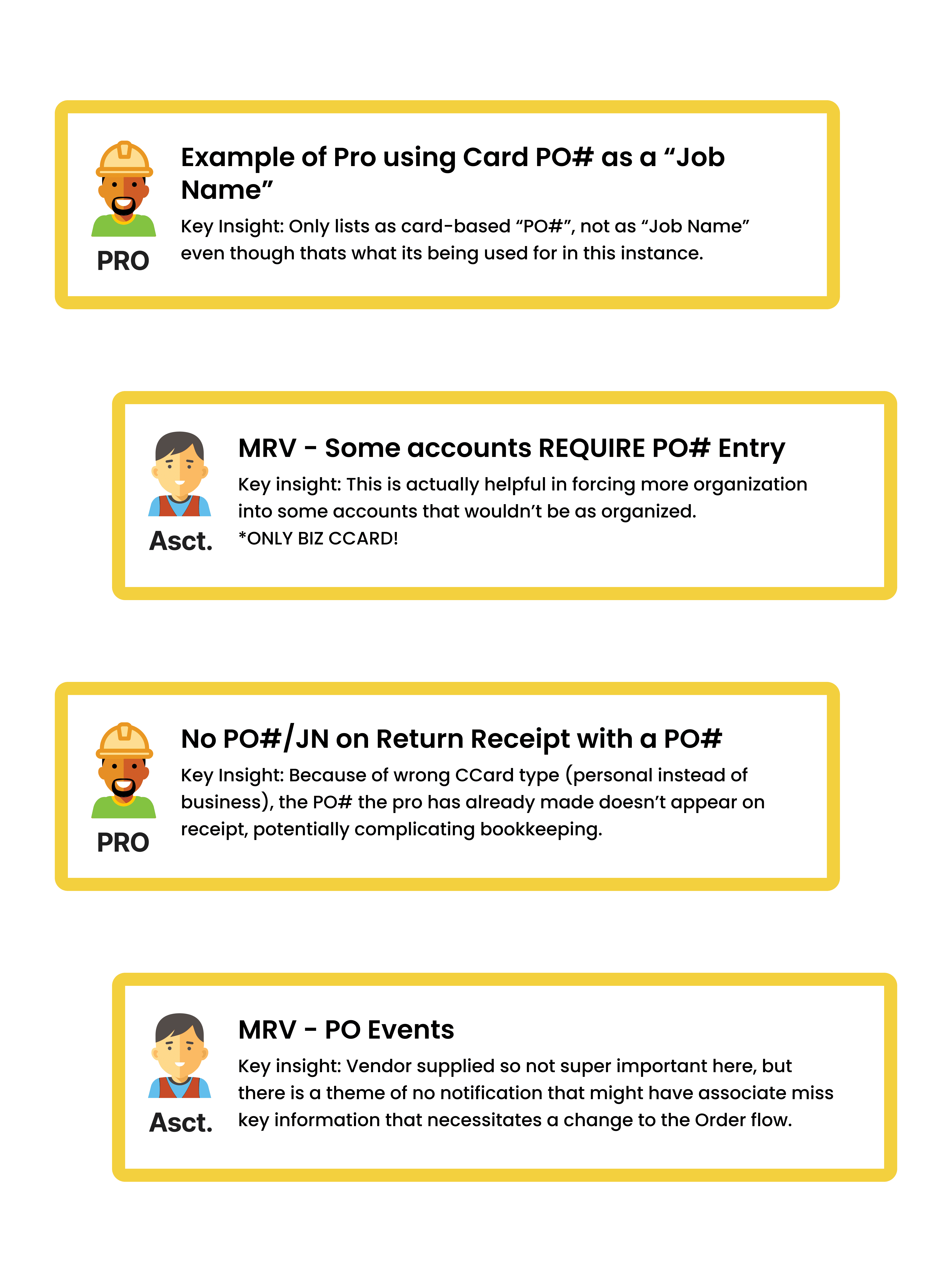
The more we understood how Pros were managing their work, the clearer the gap became. So we asked:

Design Principles
To guide our decisions, we established a set of principles grounded in how Pros actually work—prioritizing speed, clarity, and consistency across every touchpoint.
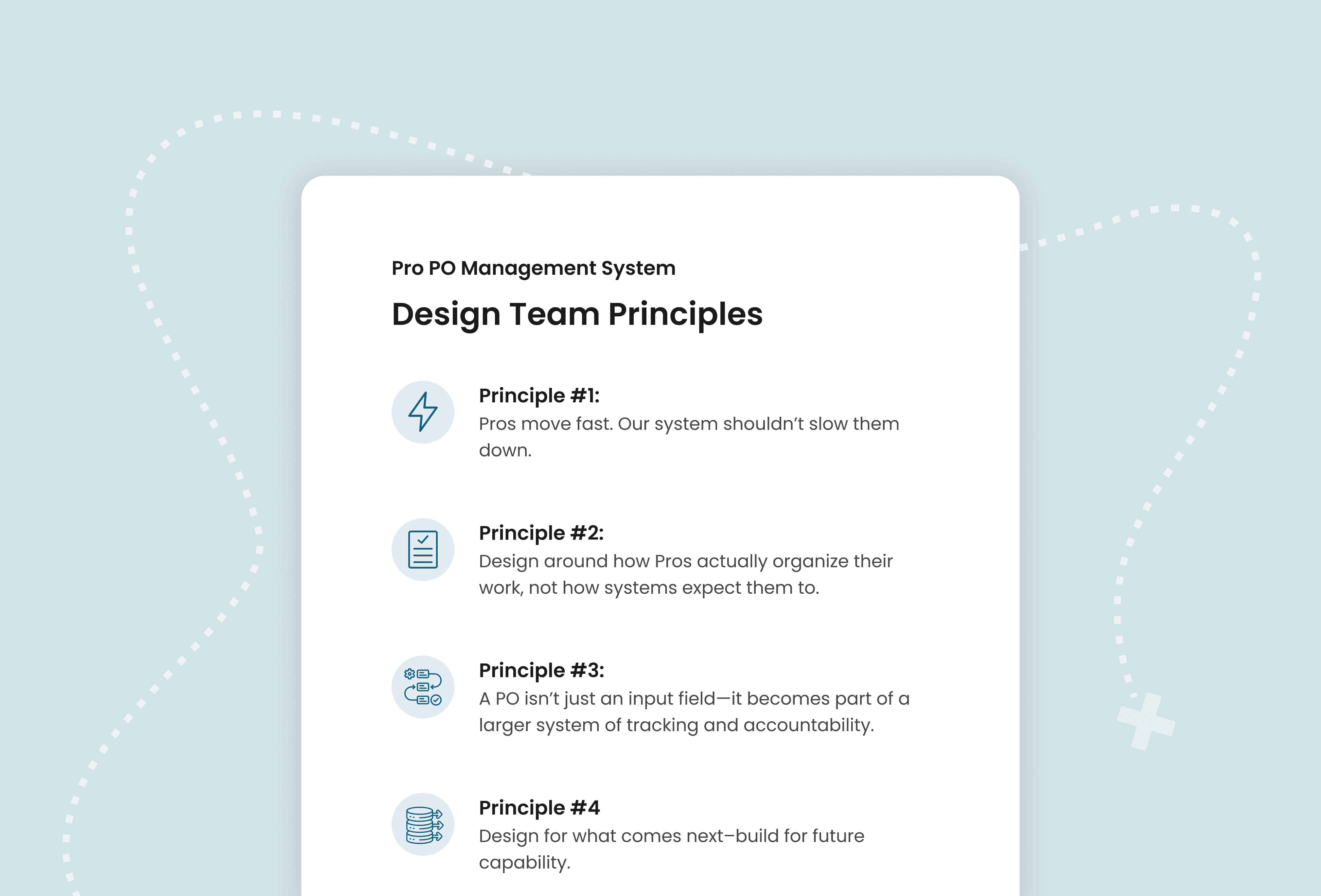
Each principle included deeper context on how it was applied throughout the system.
With these principles in place, we began iterating on how PO management could come to life—testing different ways to create, apply, and recall POs across the experience.
Smart PO Input System: Core Mechanics
At checkout, Pros needed a fast, reliable way to attach POs—without slowing down their workflow or re-entering inconsistent values. We designed a single input to handle recall, search, and new entry in one place. Below are the core mechanics that power that interaction.
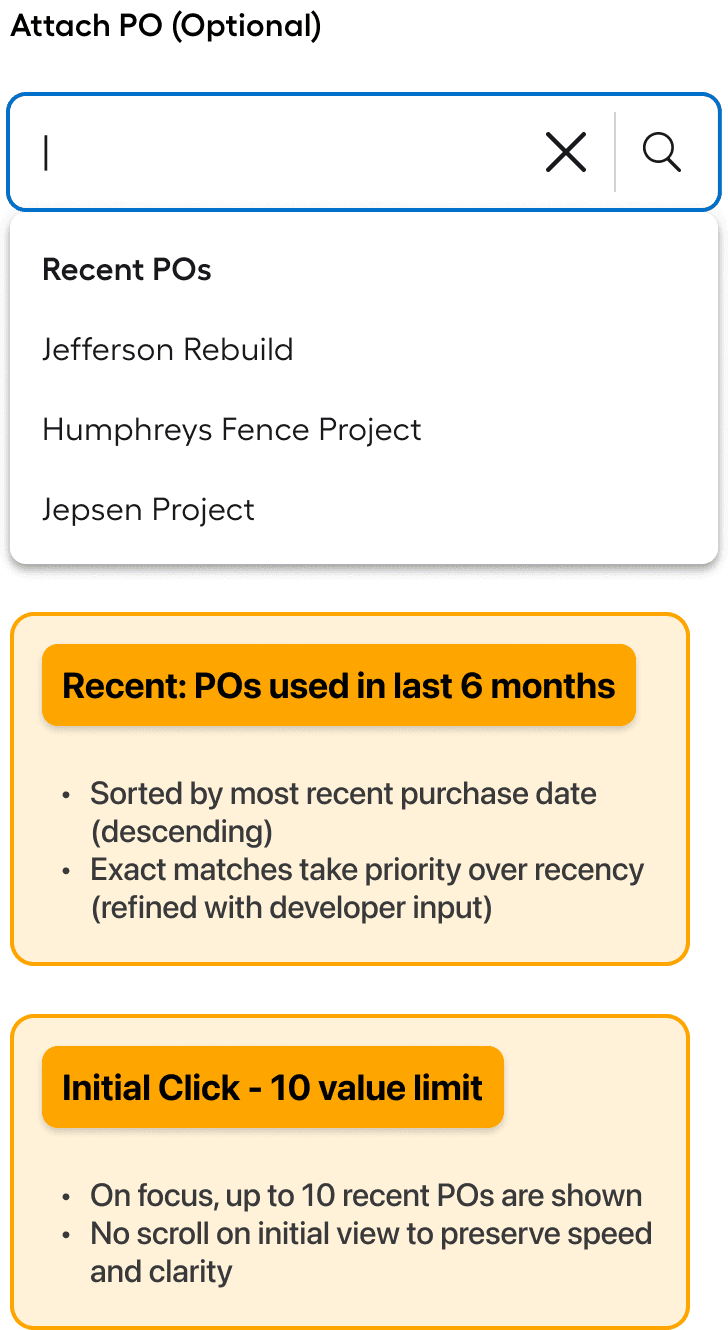
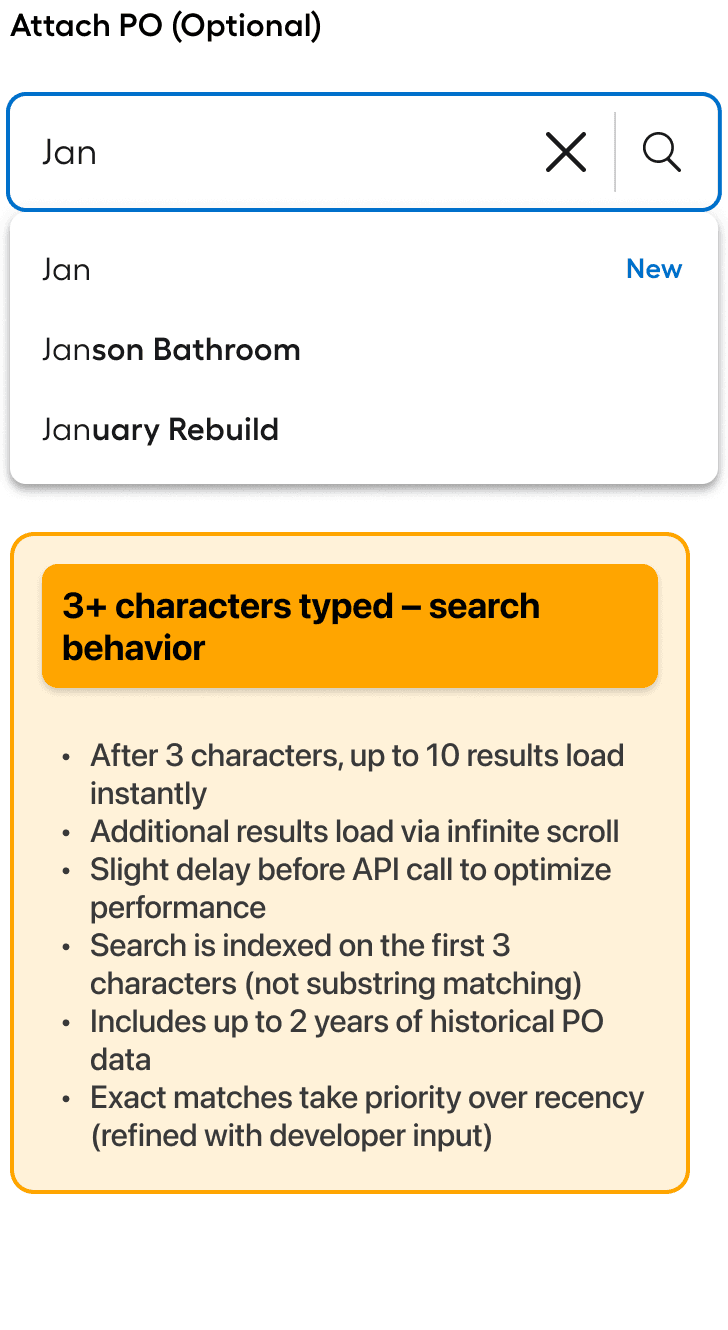
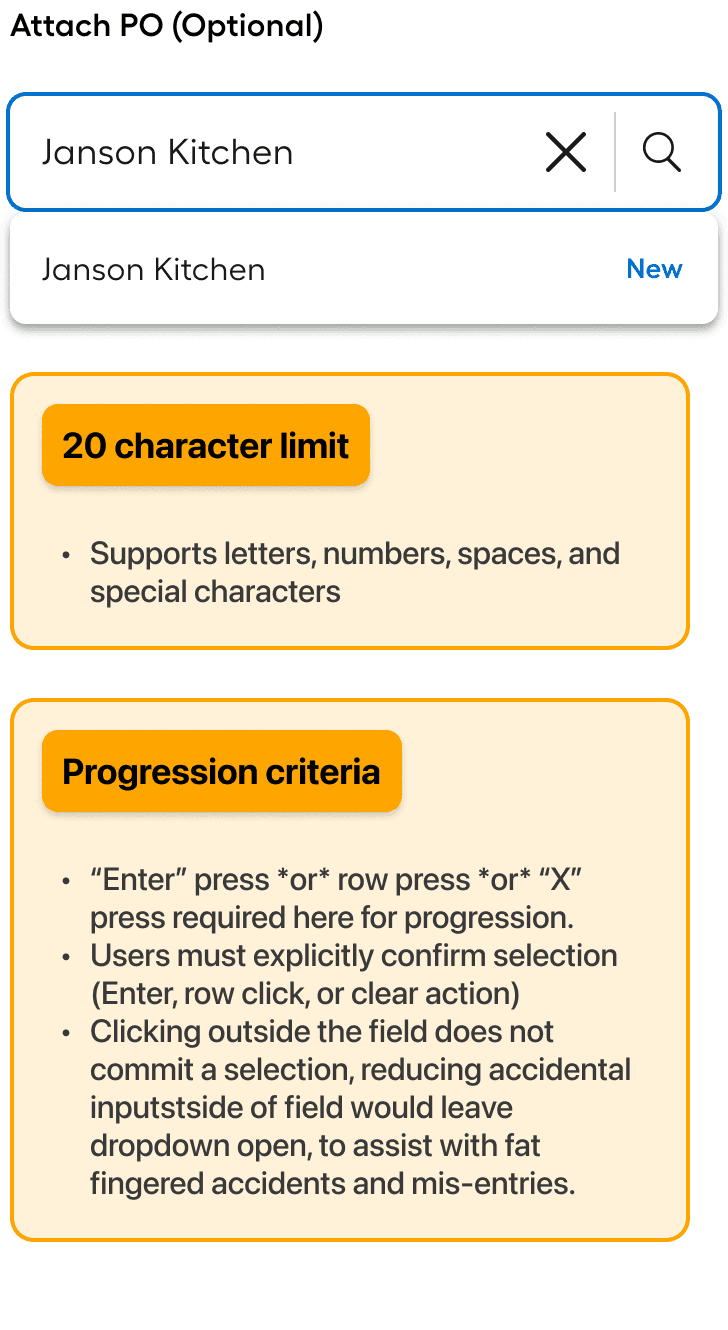
The Smart PO Input system—showing how users recall, search, and create POs within a single interaction.
The strength of this method was that it solved a real user need while introducing a pattern that blends actions not typically housed in a single input. It required a significant amount of collaboration with engineering, as they defined the final mechanics and backend integrations, while I focused on tweaking the user interactions and workflow logic.
✨
Key Insights
“Recents” made the first release: "Recents" was almost deprioritized for first release, but strong user testing results (84% of users rated it 5 or higher on a Likert scale) led to a shift in priority, allowing it to make the final release.
Show exact matches higher: There were some issues with some POs getting pushed down further down the list of results than desired, so we reconfigured some of the backend rules so that a perfect match would show earlier.
Seamless for subordinates: The input was designed to work naturally for users restricted to existing POs. Those users tested 92% as high in satisfaction scores as Admins, proving their experience didn't feel limited or incomplete.
Users could now recall, search, and reuse POs—eliminating inconsistent re-entry and improving data reliability. But the interaction alone wasn’t enough.
What if users needed to move orders between POs? What if errors or changes occur? To truly support how Pros organize their work, we needed to build the managing system around it.
PO Manager - Core Functionality
The PO management system was initially a feature set that came out a realization that many Pros managed their projects around a unique identifier. as we helped them ground that unique identifier from the ether, we created a more robust way to manage those values.
Who created that PO? Who was using it? Are we going over budget yet? These and other key questions needed to be relayed to users in an easy to understand and easy to manage way. We gave a increased toolkit for our users where they were able to expand rows, and see who's doing what in the system.
To get a better understanding of the functionality of the system as a whole, let's dive into each feature-set individually. Each layer plays an important role in how the system helps users parse the data and take timely actions based on their evaluation.
Row Functionality
We discovered pretty early on that users wanted to organize their data by key identifiers. Yet, as described earlier, the real rub was that allowing more than one key identifier muddied the waters, actually slowing our users down. Choosing to necessarily lead with PO allowed us to maximize the usefulness of the system for users.
The second order information was important too, and we wanted to align with what users would want to see. We determined that tracing back up to the first order elements conceptually and visually would be a great framework for our users to track PO usage across orders.
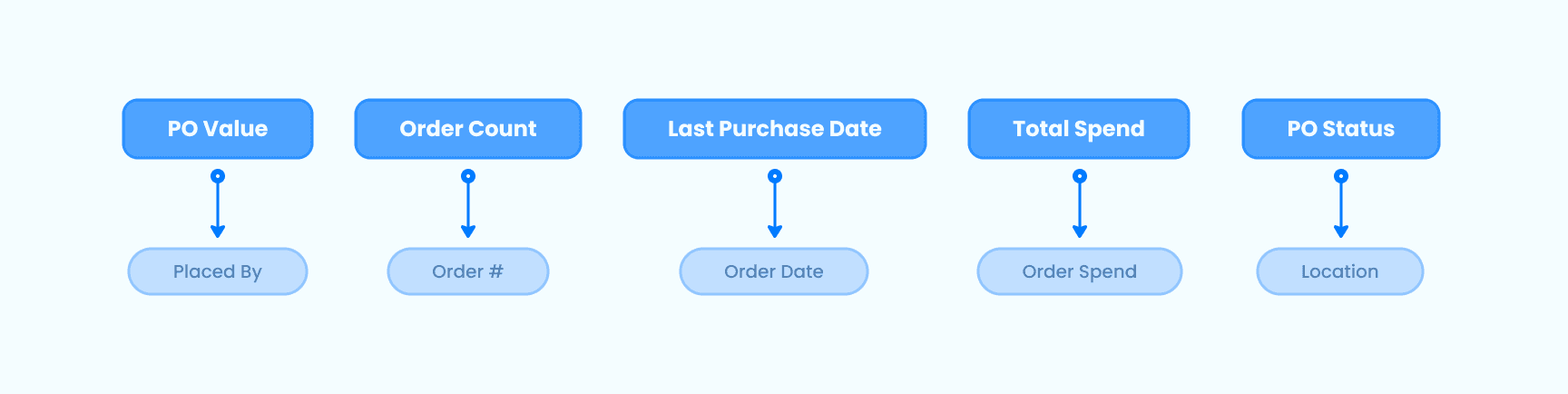
A graphic showing the relationships determined to be "valued pairs" as determined by in-person interviews, working sessions, and card sorting.
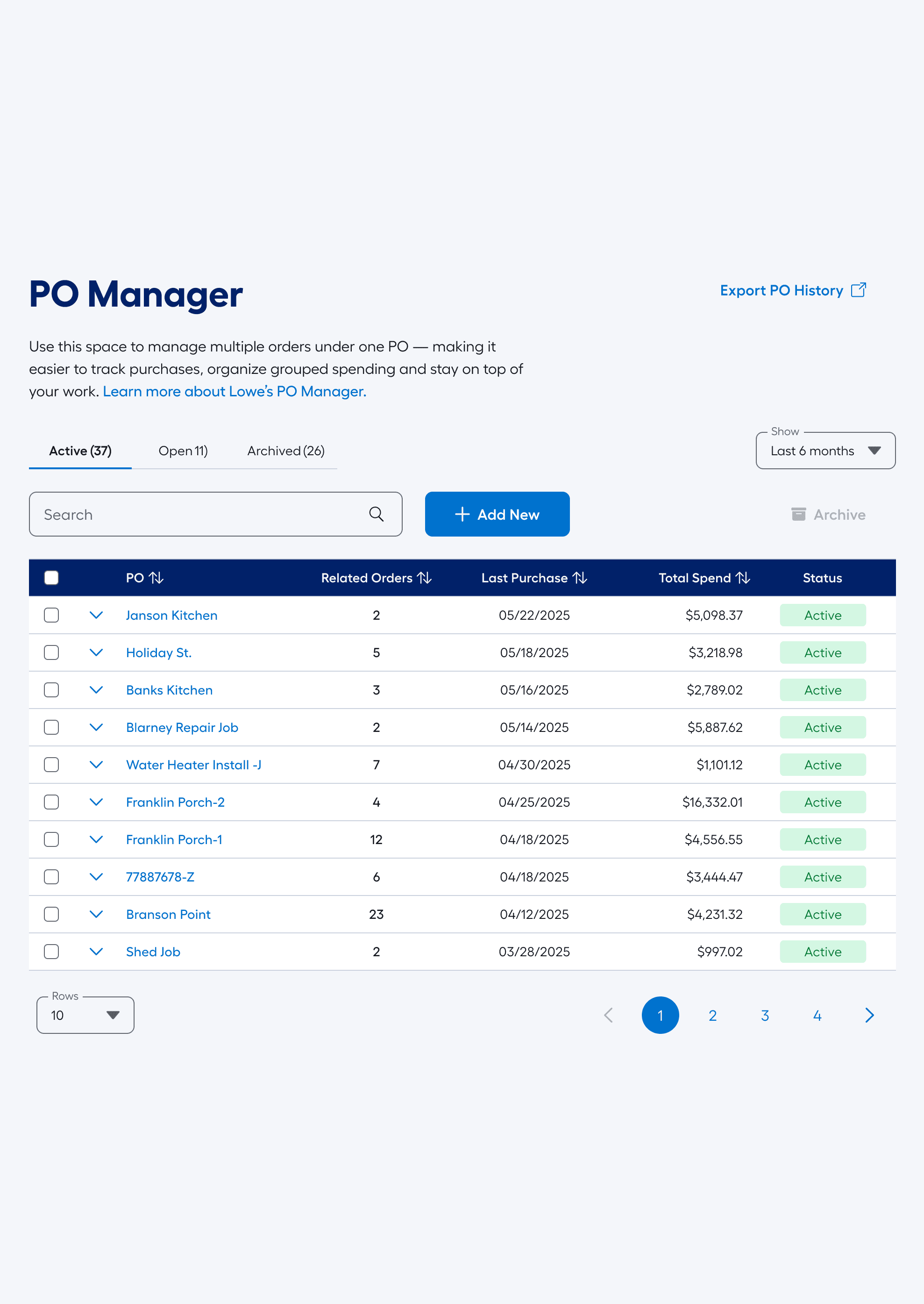
Default view - The PO Manager loaded with POs and purchase data.
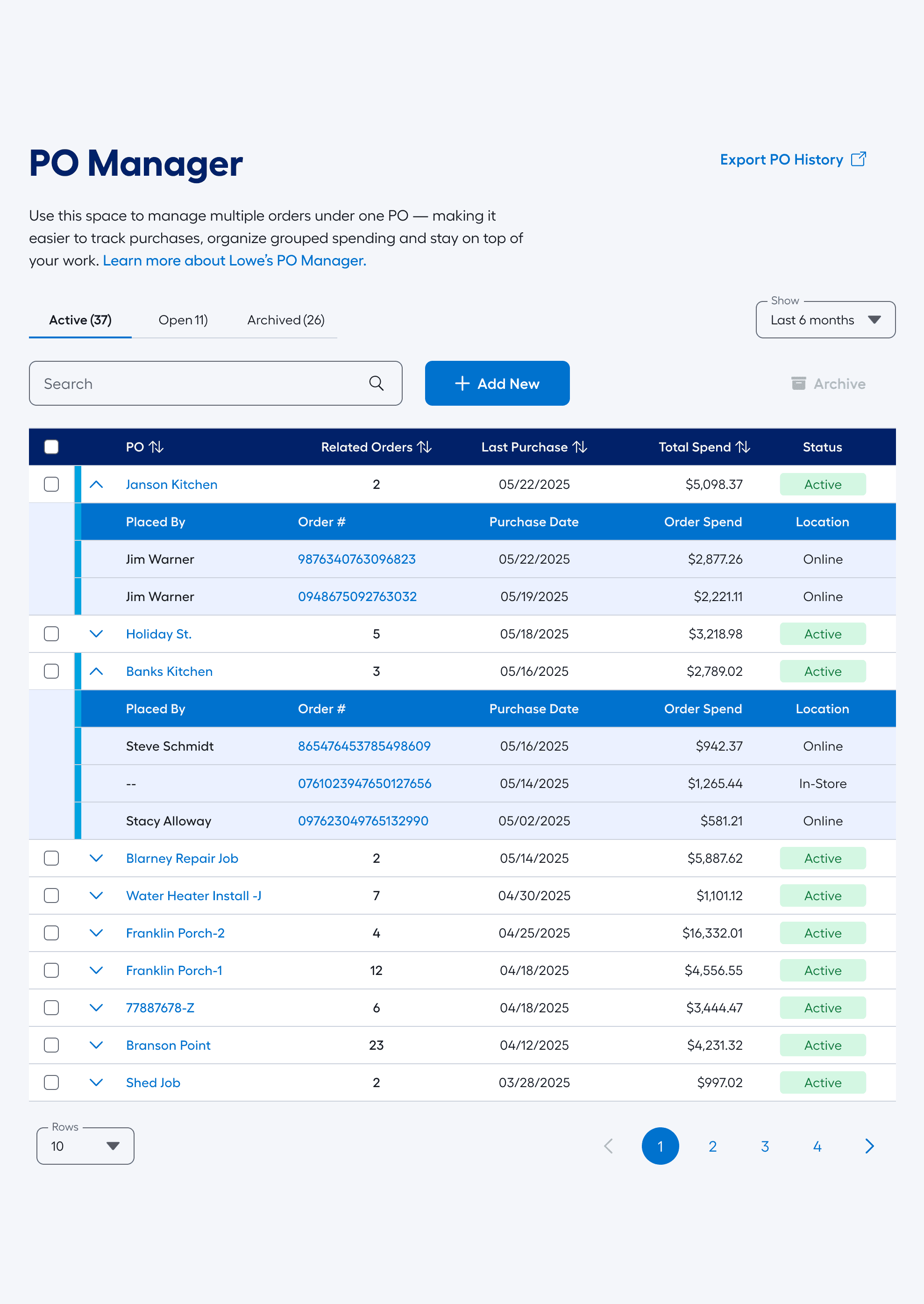
Expanded view - The user is comparing the contents of two different POs.
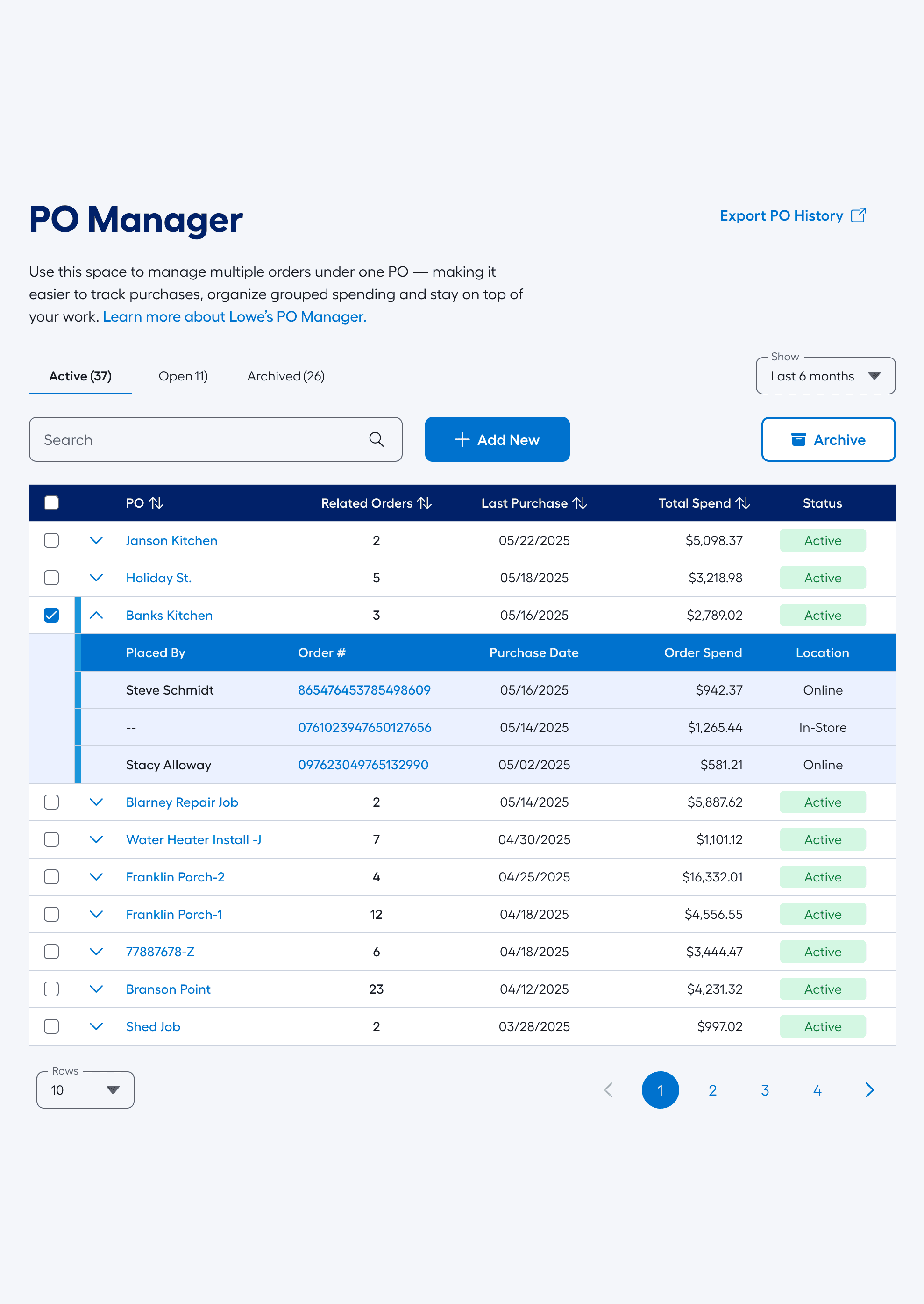
Selected view - Banks Kitchen PO is ready to be archived as the project has been completed.
While row functionality was a great value-add for back-office workflows, what about the runner who just showed up to the jobsite with 2,000lbs of concrete? We had to make sure the system had affordances for them as well.
Mobile Considerations
Our typical guiding principle at Lowe's has been mobile-first, and with good reason. 72% of our online traffic comes through either the mobile-app or Mobile-web. This is why we lead with Mobile frameworks typically. The thing about the PO manager though is that it solves a particular purpose for mostly back-office types, and through our research, most users who would use the system regularly wanted tabular-based data. No pretty pictures, no airy spacing: hard data in tables.
The issue arises that tabular data is tough to show on a small screen, really tough. Because of this we worked through a mobile-specific display and framework to help our users who were checking details while on the job-site. With this approach we could address both the core users on their computers running their books along with the runner who's making sure the order was logged properly.
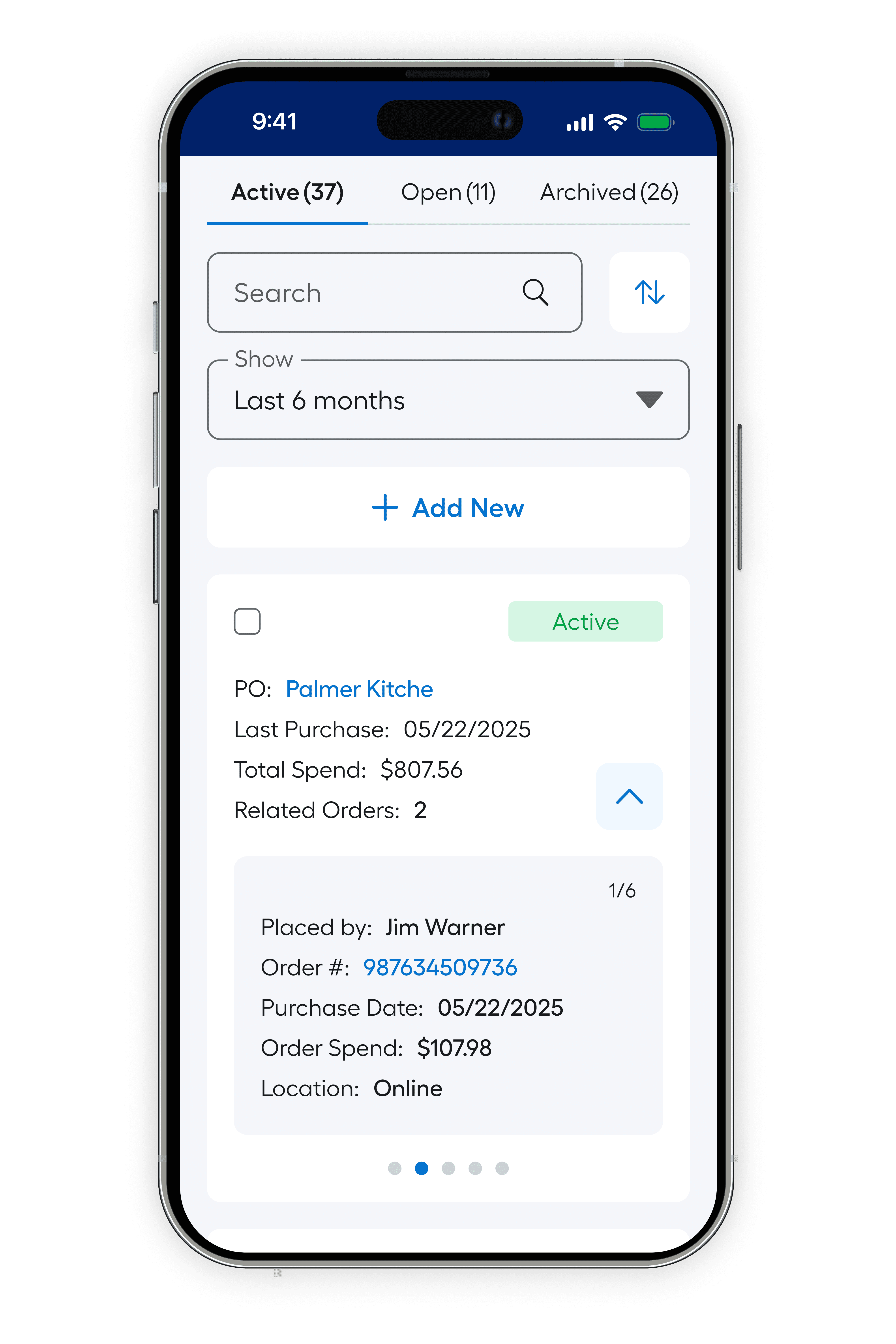
Mobile PO Mgmt.
Design for the Go
We realized that users didn't need to see everything that they could on the desktop view, but that didn't mean it couldn't be useful and intutive.
The Status-type tabs are a sticky header no matter how deep the user scrolls, and once the user selects a PO, the action controls slide in from the bottom in a very smooth motion.
The User can scroll through all the sub-values as well, to keep themself grounded on the PO they have selected.
Due to bandwidth for first release, we needed users to be able to seamlessly enter and exit the PO Manager from the App experience as well as a pure Mobile-web experience.
Users were still able to conduct easy and streamlined flows on their mobile device as well as their computers.
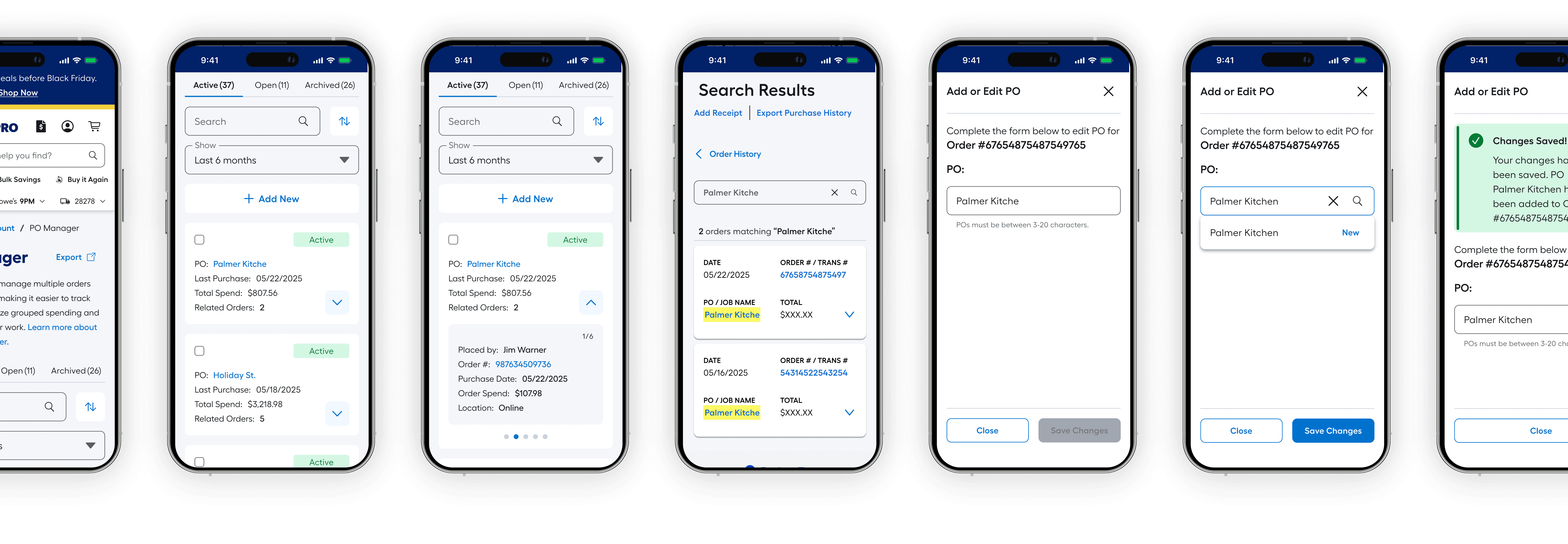
A view of some of the mobile screen progressions. Note: some of the screens shown were established methods at Lowe's and could not be altered.
Status Types
It was realized early on that we would need to have different states for the various POs in the system. How would the users manage the POs they needed while pushing aside those they didn't need anymore? We faced the challenge head on and from an enterprise logic standpoint.
One of the worst parts of the prior system was that users couldn't "get rid of" the POs that they didn't need anymore. But much worse, they couldn't recall or reference in an intuitive way the POs they did want to use (think napkins and loose pieces of paper). With the help of the devs, we established an accurate and easy system of earmarking the various POs
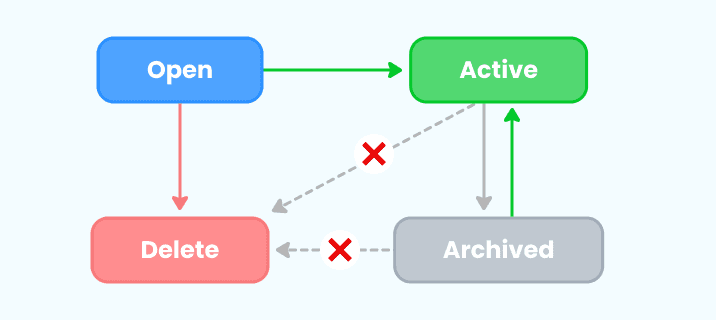
A simple diagram showing the various status directions a PO can move between.
One key dynamic of the Status system is that there is only one action a user can take on each Status type. This makes the system logic rock solid.
You'll notice that users cannot delete a PO from the Active or Archived Status type. Logically this makes sense because if there is even one value associated with an order, to remove the PO from the system would corrupt the associated data with that order. If a user goes to their Order History screen, we have to give them supreme confidence that all their orders exist in the system.
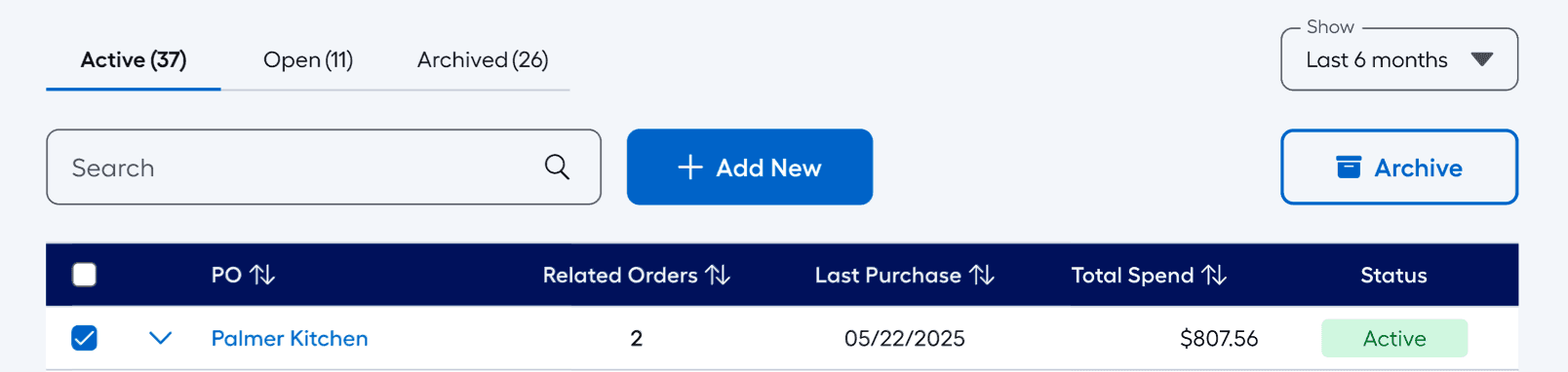
A view of the various states that a PO can be in. Notice the right CTA that becomes activated if a PO is selected.
If a user wants to remove a PO from the values they or their subordinate can refrence in the system, thats fine, but requires a moving it to the Archived Status.
This frees up system memory while keeping a coherent "paper trail" of data that won't get lost in the shuffle. Need to reopen an archived value? Simply enter the Reactivate flow to bring it back into the fray.
Renaming POs & Moving Orders
Off the cuff, renaming a PO or moving orders between POs might not seem like a big technical effort but don't let the apparent simplicity deceive you.
There were a variety of reasons a user might want to rename a PO or move orders; a misspelling, separating values between jobs, misappropriation of materials, etc… the list goes on. As we dug deeper, we came across numerous logical dilemmas in renaming POs or merging PO flows.
⚠️
Caution
Rename is taken: Should users be allowed to rename to an existing value (in effect merging)? Should we stop them or let them proceed with warnings?
Empty PO? If a user moves all Orders out of a PO what happens to the PO? Does it automatically get Deleted, move to the Open Status or do we need a deliberate action by the user?
History Repeats Itself: If a user makes a "new" instance of an archived value, how do we know what the users intent is there? do we notify them or is it OK if they make a new "Garage Rehab" PO? OK if it's past a certain timeframe?
Before we let the logic games spiral, I stopped the show right there with a simple notion: let's expand the functionality of the Order History page slightly to accommodate the increased needs from the PO management system. I conferred with the devs to see how much load we could put on the Order History functinality.
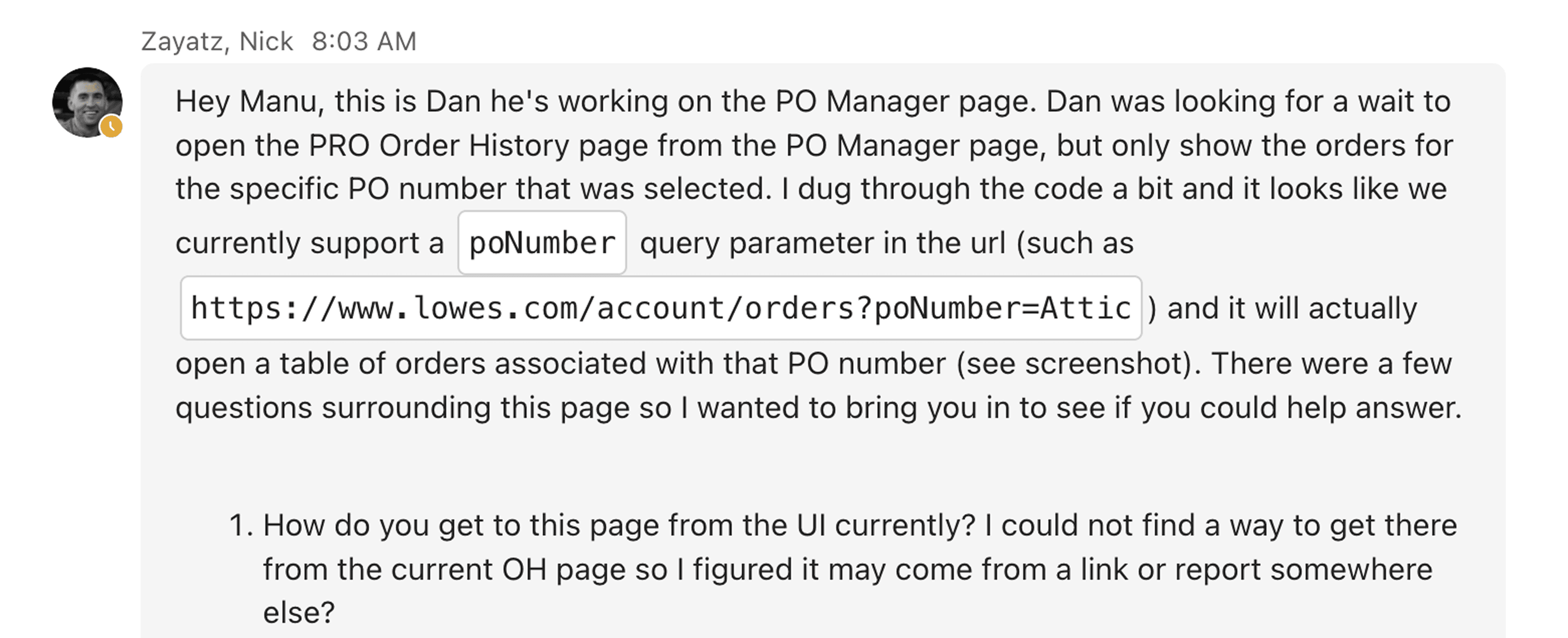
screenshot showing the devs bringing me into the conversation around Renaming POs from the Order History page.
Through the dev discussions it was determined this approach was possible! By proceeding with this method we took a sizable amount of strain on backend services needed for PO Management and shifted it to the existing calls on the Order History page. Below is a showcase of the simplified Renaming flow.
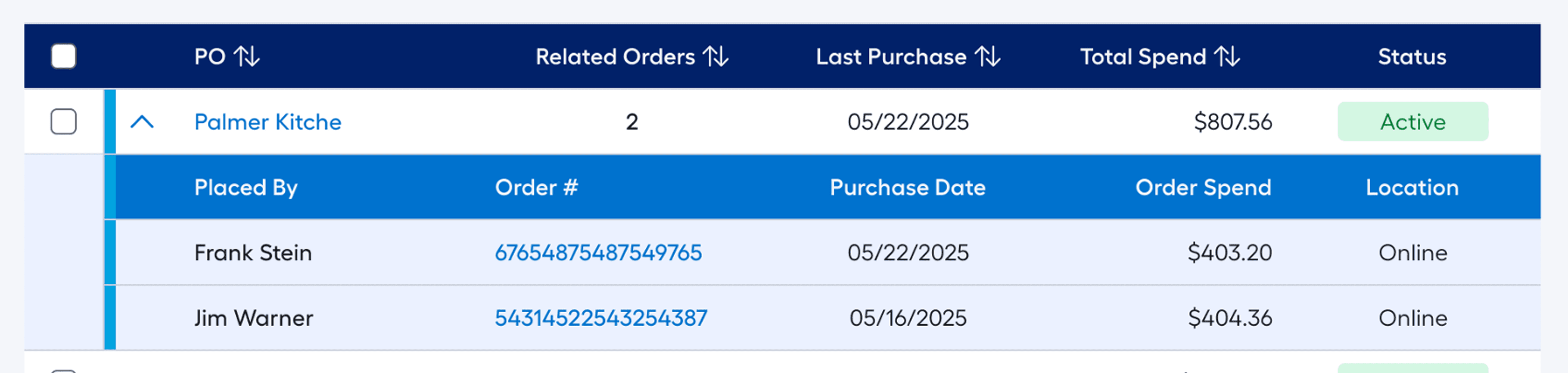
On the PO Manager, user realizes there is a misspelling. Clicking the PO sends them to the Order History page, providing a view of all PO instances.
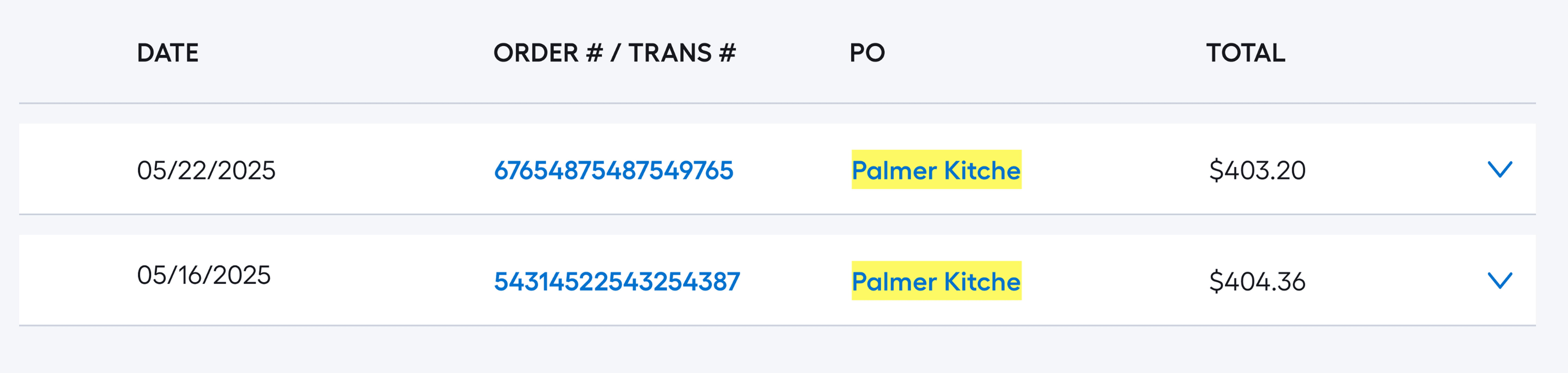
Upon clicking the Order instance of the misspelling, user clicks the value, triggering a flyout.
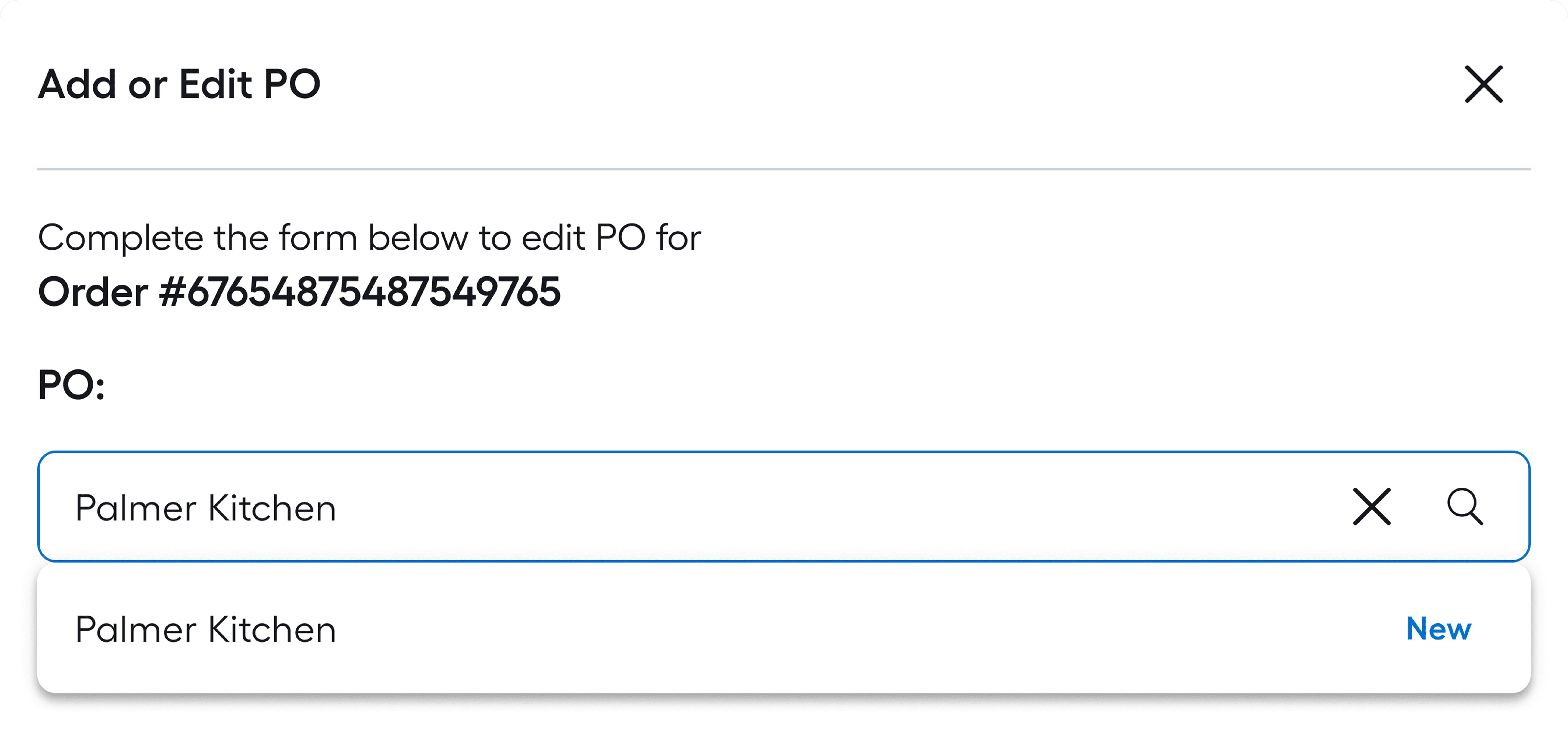
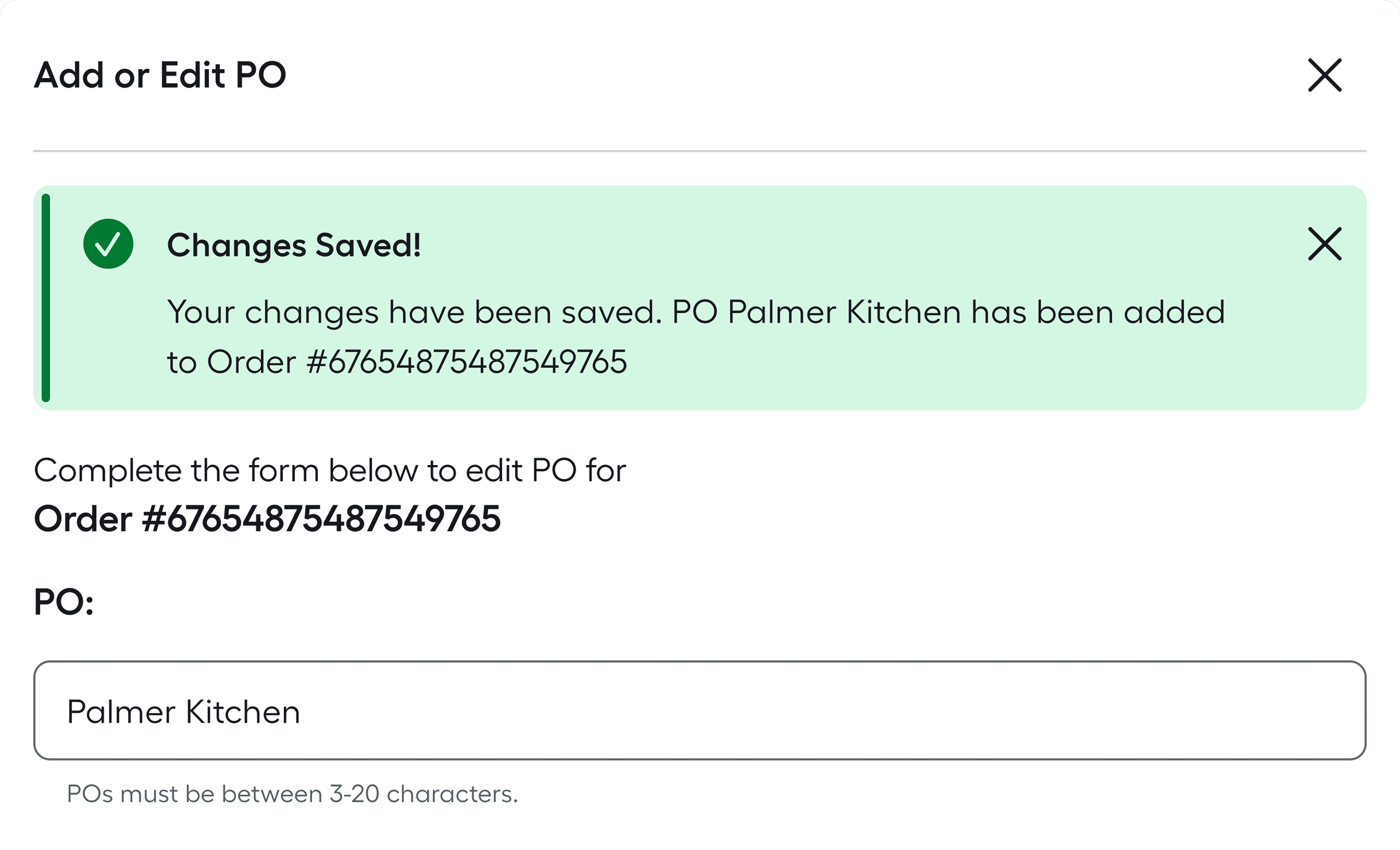
User has successfully renamed the PO Instance.
This solve wasn't the type that would get you a standing ovation, but it was the type that got the product across the finish line faster and recalibrated resources back to what was really needed.
Learning the System
While it was always our goal to make the system simple and intuitive, we of course had to factor that users would want a location to learn the basics.
We had an assortment of ideas at the outset, from full page overlays, clickable walkthroughs, ai agents, you name it.
What we came up with was a super-simple flyout triggered in the main body copy of the page. We refined it down to the most important 4 topics so that no scrolling would be needed.
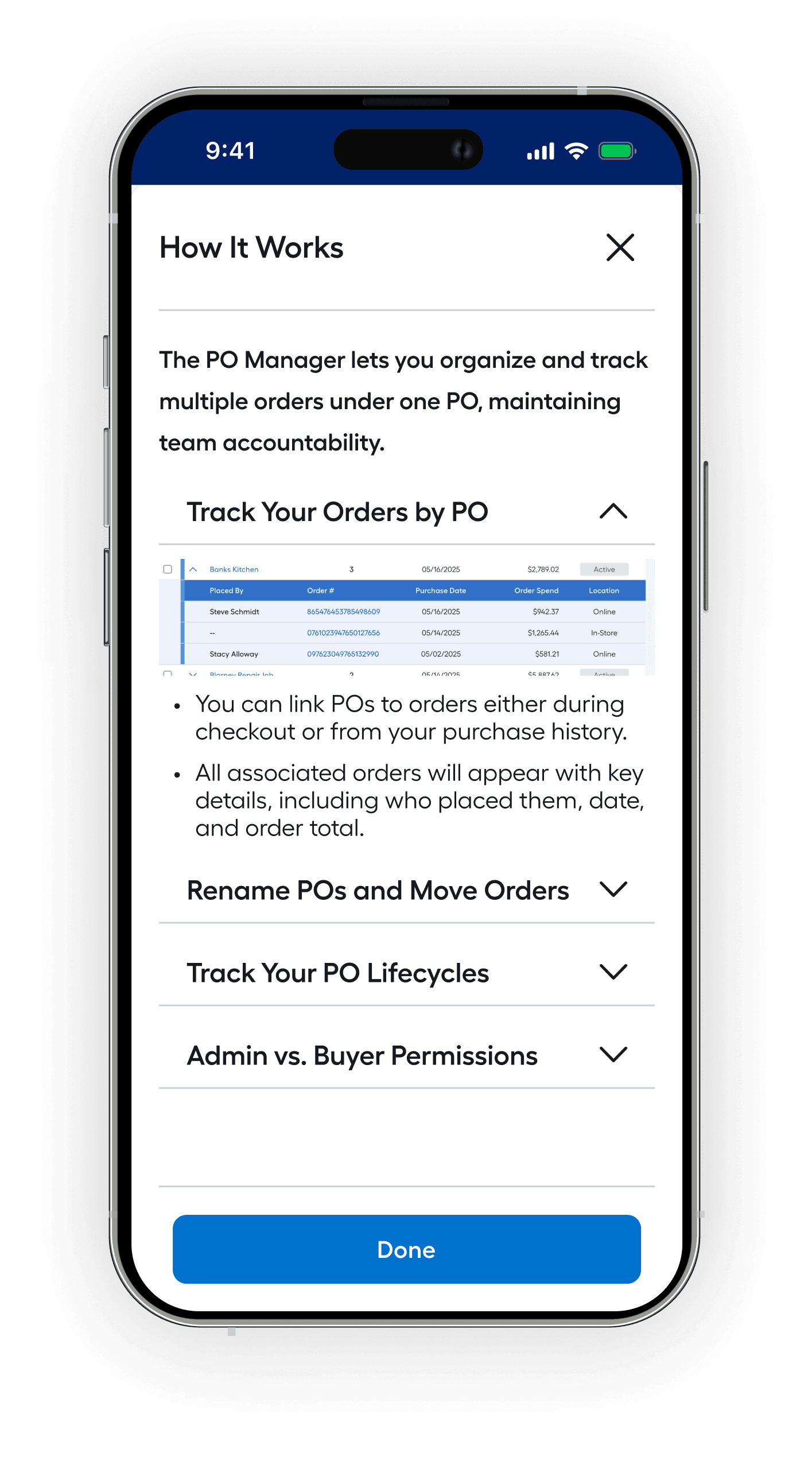
A view of the flyout upon first open. Notice that the first accordion value comes pre-loaded in the expanded state.
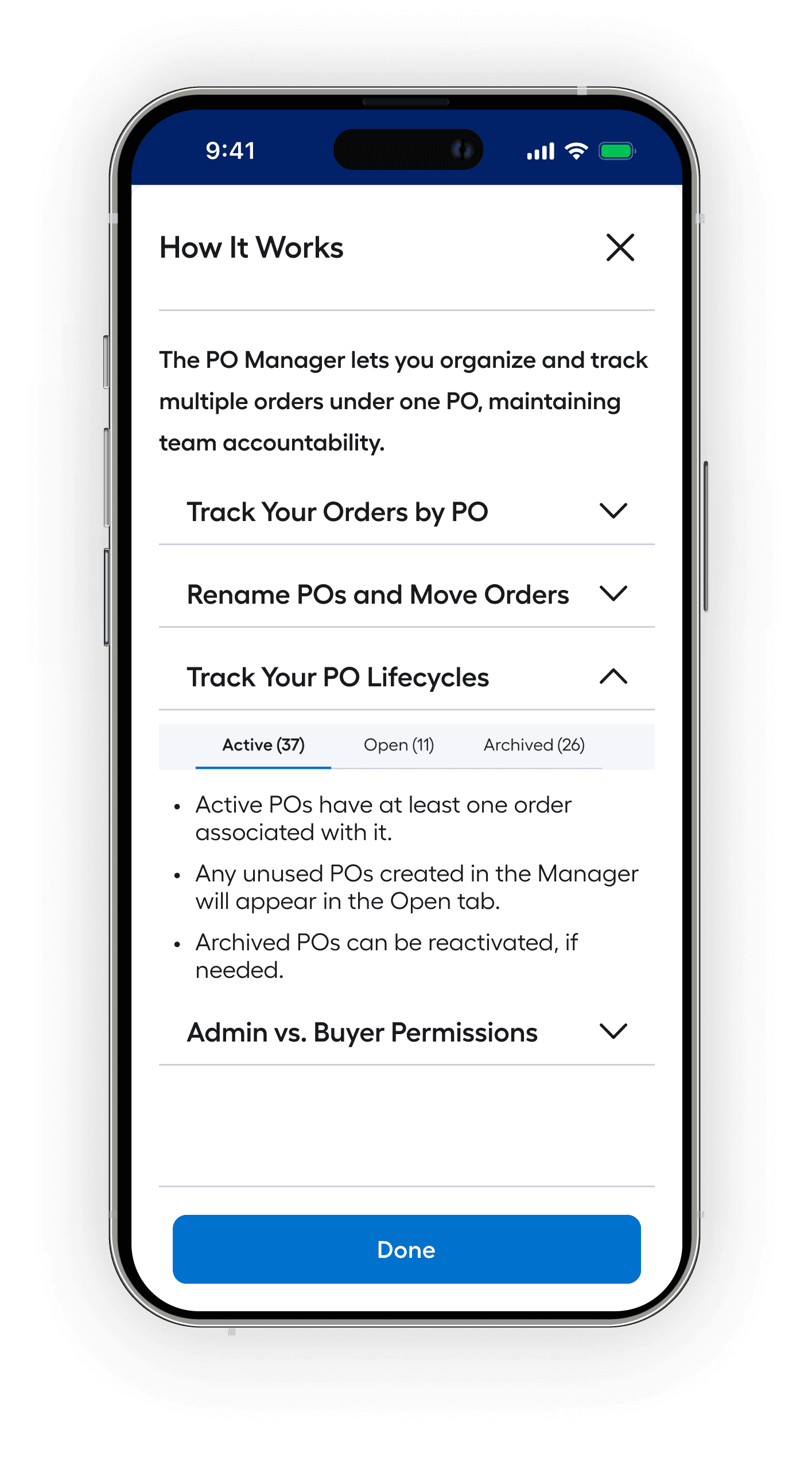
A view the Track Your PO Lifecycles section expanded, our third-highest ranked learning item.
Learning Flyout
Learning how to use the system was important for users, especially on the front end of using it, but what about once users really started using the system? You may recall my mentioning that some users expected to use our system to completent their in-house tools. So how did we plan on getting our robust data off of our servers and into their spreadsheets?
Exporting PO Data
Near the very beginning of this project we got feedback from users that they would appreciate being able to plug this data into their existing external systems. Sure there were some users that the Lowe's interface could be their be all end all, but those who have a sophisticated internal system often are some of our biggest spenders. We had to think about them in our workflows.
Besides that, exporting was brought up by some of our key Directors and stakeholders as a crucial solve for many of our bigger customers (Hint: our big spenders could make waves). If they couldn't export, the management systems' usefulness was greatly diminished.

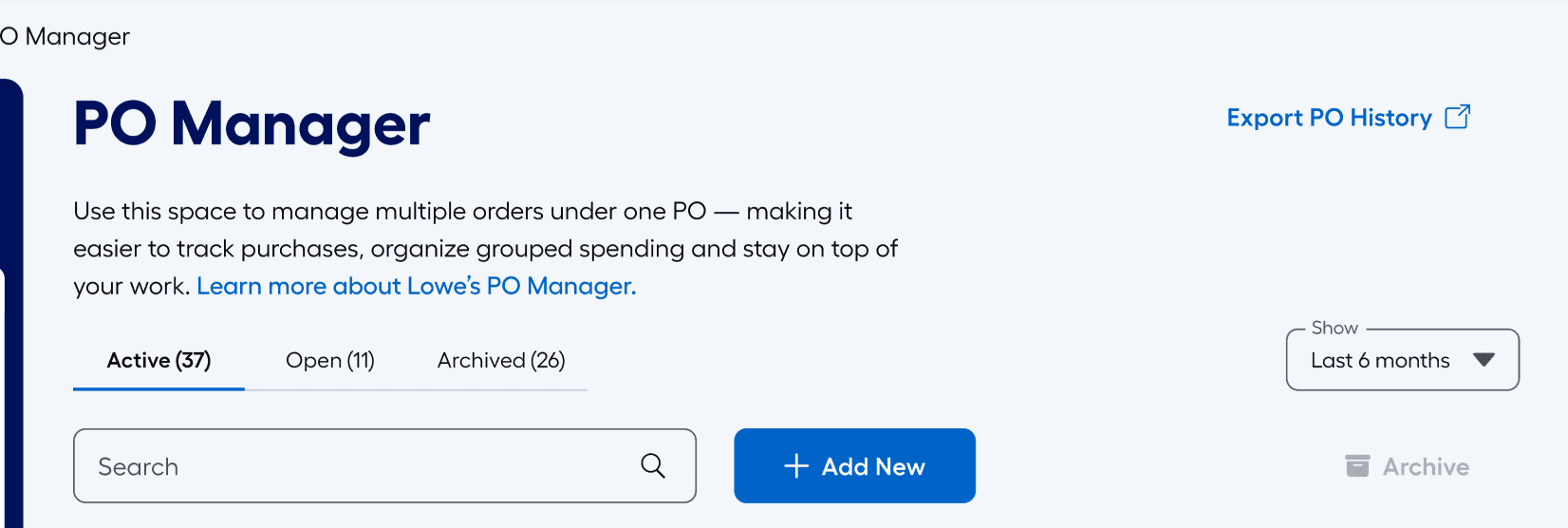
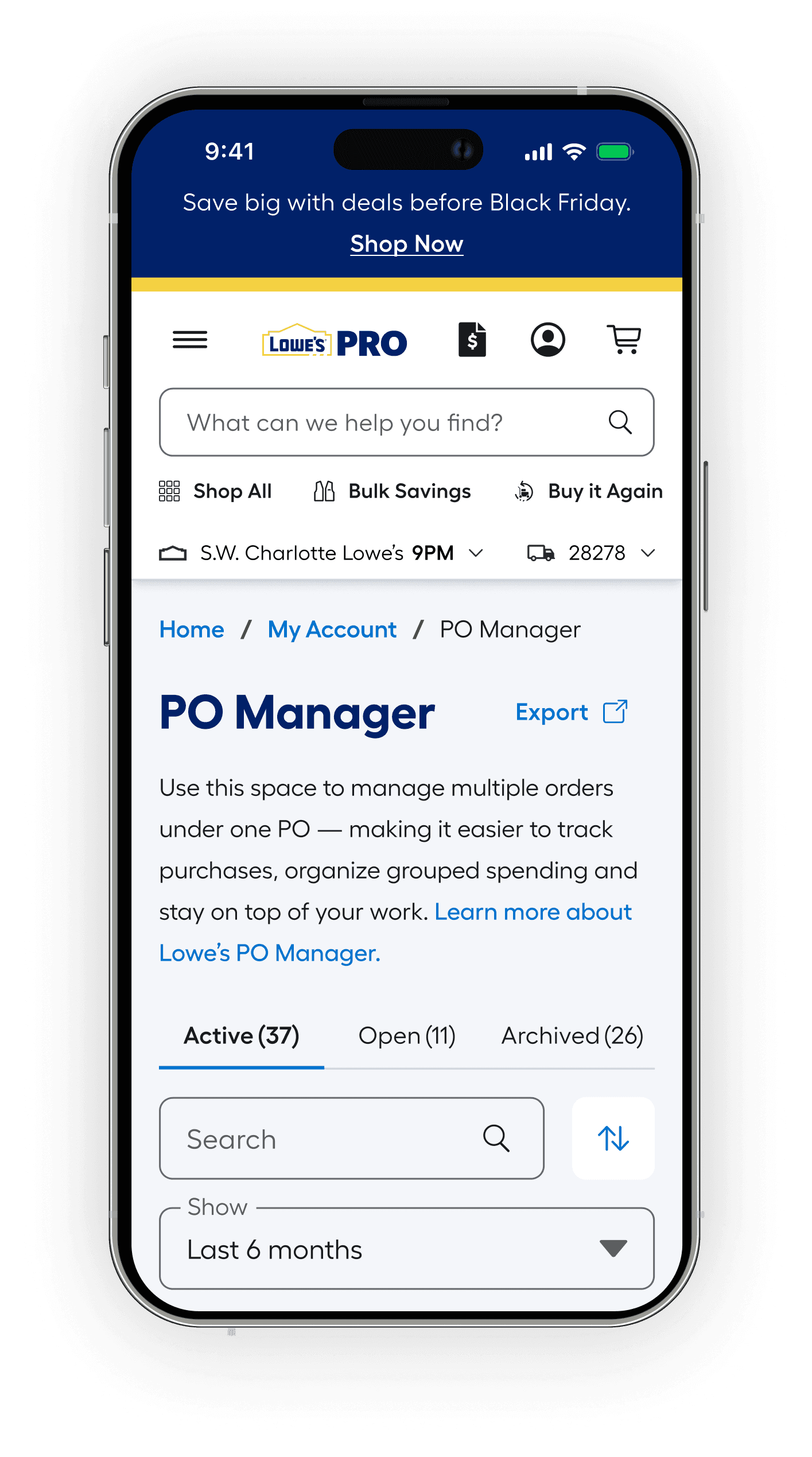
A view of the PO Manager page. Notice the easy access Export PO History ghost CTA in the upper right.
The final exporting functionality was packaged into our initial release. I also paired with the Designer from an adjoining team putting the final touches on the Spend Reports & Analytics feature set (an adjoining product). To assist our users, we made sure our exporting functionality matched closely between the two workflows.
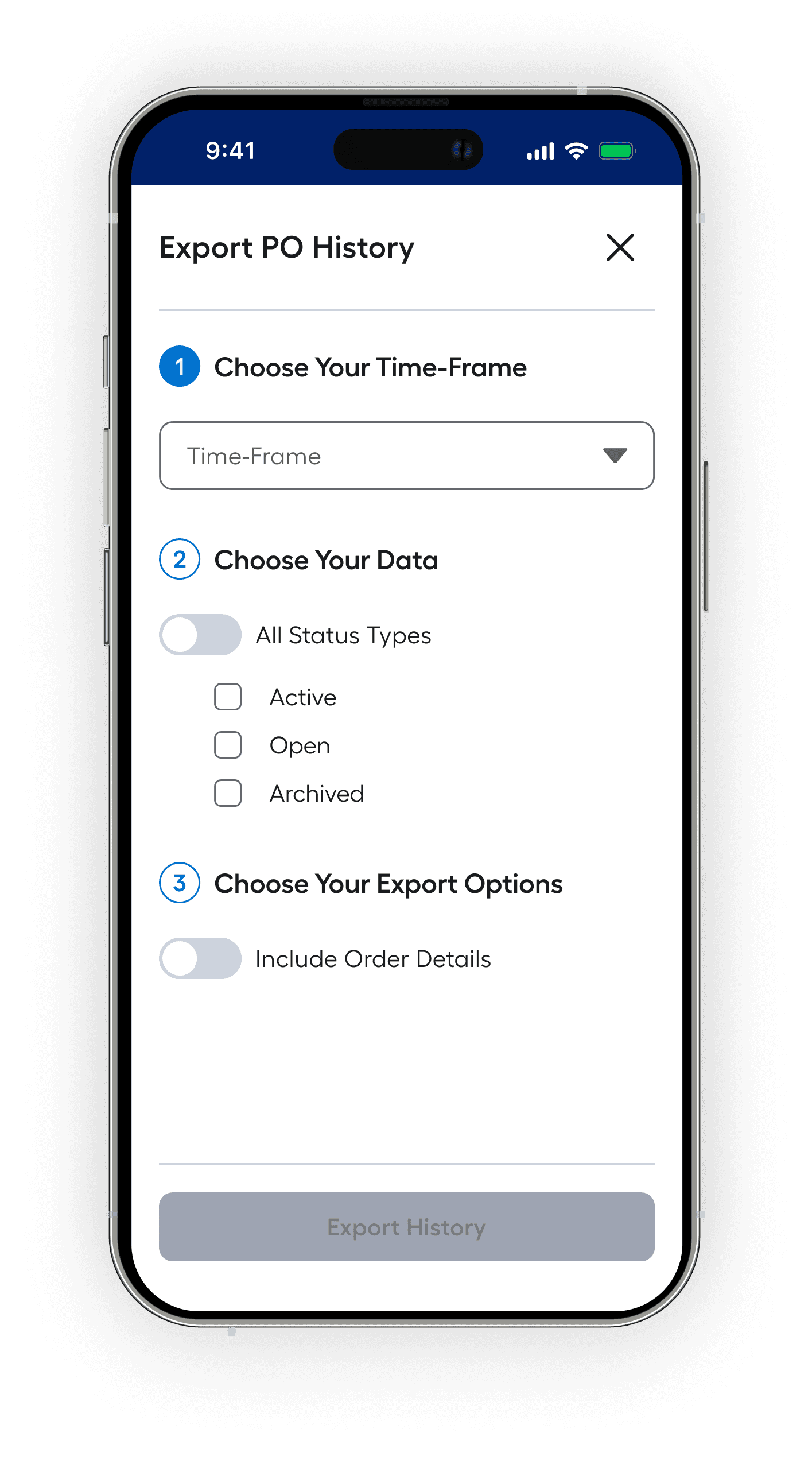
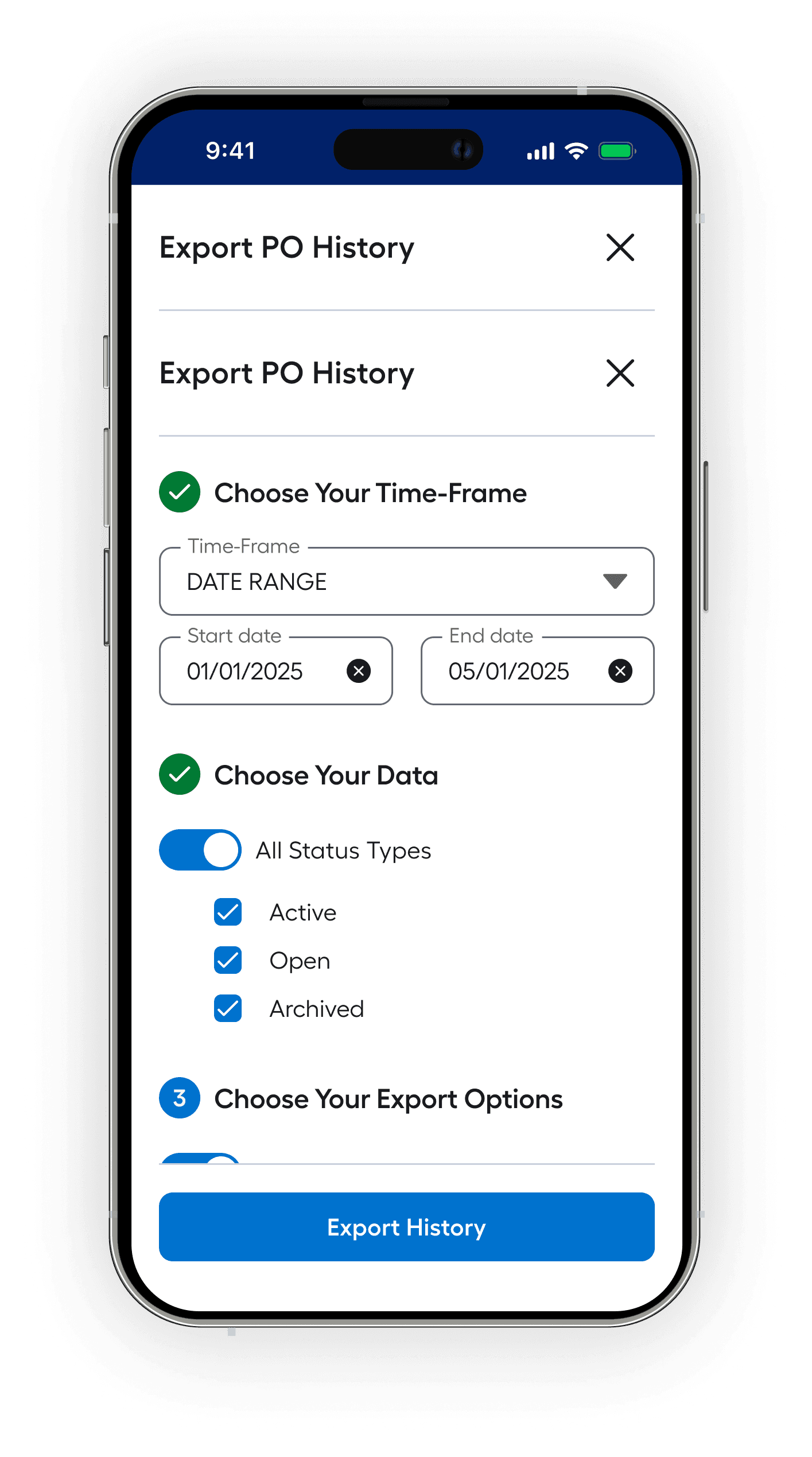
A screen progression of a user exporting their data. We found there were many reasons to export.
Future Releases and Initial Feedback
In the lead up to the initial launch, we had a email campaign and initial documentation aimed at Pros who pass certain metrics, prioritizing existing customers over a more broad category.
The product was released with an overwhelming success. In our release we saw an increase in usage among existing users without any initial marketing spend.
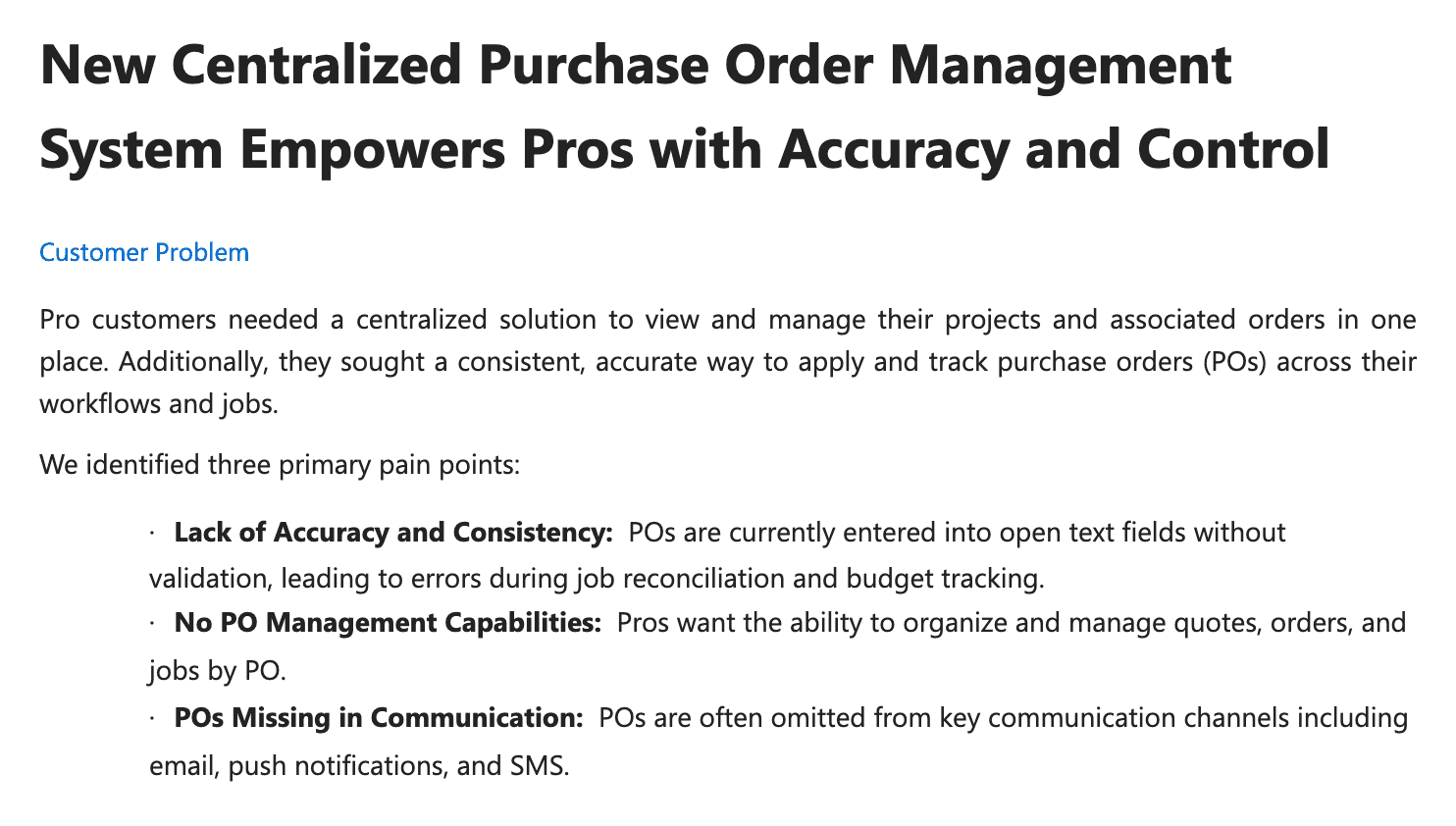
A representation of the release notes pertaining to the PO Manager. It received great fanfare on initial launch, both internally and from customers.
As part of our work in this space, a guiding principle was to keep the functionality options open for future releases. There were some things that we weren't entirely sure of but had thoughts that would be improvements going forward.
As touched on earlier, we made sure to tie this in with our existing functionality of Spend Reports and Analytics page along with the broader Org Settings page on the Lowe's site. There are future opportunities to find synergies with other products across the Lowe's ecosystem and we are looking forward to those potentialities.
We have the bandwidth and metric-based feedback (Medallia user feedback, MyLowe AI chatbot feedback, and incentivized reviews) to circle back to address any unseen dilemmas, new opportunities, or ways of reconfiguring the functionality based on feedback.

Reflections
This work was shaped as much by the team as the problem itself. Product, engineering, and design operated with shared ownership—challenging assumptions, aligning quickly, and staying focused on outcomes over outputs. That level of partnership made it possible to navigate real system complexity without losing clarity or momentum.
It also reinforced something I’ve come to value deeply: strong systems don’t emerge from isolated decisions—they’re the result of consistent, aligned thinking across disciplines. The team’s ability to balance user needs, technical constraints, and business goals is what allowed this to scale beyond a feature into something foundational.
The result is a system that holds up under real-world use—structured, reliable, and built to scale. I’m excited to see how it continues to evolve, particularly as AI begins to play a larger role in improving recall, reducing friction, and unlocking more intelligent workflows.